FC CONTROL HYDROGEN DETECTOR(for Hydrogen Tank Side) ON-VEHICLE INSPECTION
PROCEDURE

 G4151
1.INSPECT HYDROGEN DETECTOR (for Front Side)
Remove the rear No. 4 floor board sub-assembly.
Remove the rear No. 3 floor board sub-assembly.
Remove the No. 2 floor board sub-assembly.
Remove the rear floor side member cover LH.
Check using the GTS
Connect the GTS to the DLC3.
Turn the ignition switch on (IG).
Enter the following menus: Powertrain / EV / Data List / Tank Area 1 Hydrogen Density
- Powertrain > EV > Data List
-
Tester Display Tank Area 1 Hydrogen Density - 50003 397 979
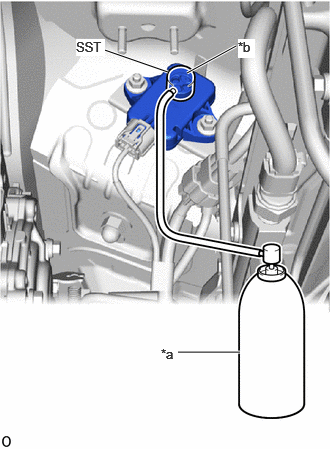
| *a | Hydrogen Gas for Inspection |
| *b | Hydrogen Detecting Portion |
Cover the hydrogen detecting portion of the hydrogen detector with SST.
- SST
- 09405-62010 (09405-06010)
Check the tank area 1 hydrogen density displayed on the GTS while injecting hydrogen gas for 5 seconds or more.
- OK:
0.9 % or more
- NOTICE:
-
Use hydrogen gas at 1.3% concentration.
- HINT:
-
The value stabilizes approximately 5 seconds after hydrogen gas injection.
If the result is not as specified, replace the hydrogen detector.
Check without using the GTS
Put the engine in inspection mode.
| *a | Hydrogen Gas for Inspection |
| *b | Hydrogen Detecting Portion |
Cover the hydrogen detecting portion of the hydrogen detector with SST.
- SST
- 09405-62010 (09405-06010)
Inject hydrogen gas for 5 seconds or more and check the condition of the hazard warning lights and the sounding of the wireless buzzer.
- OK:
Detection Status Specified Condition Detected (check result is OK) ·Hazard warning light illuminates (each light turns on 6 times or more for 5 seconds)
·Wireless buzzer sounds (each buzzer sounds 6 times or more for 5 seconds)
Not detected (check result is NG) ·Hazard warning light does not illuminate
·Wireless buzzer does not sound
- NOTICE:
- ·
Use hydrogen gas at 1.3% concentration.
·Perform with the ignition switch ON, READY OFF, and the FC system stopped.
If the result is not as specified, replace the hydrogen detector.
Install the rear floor side member cover LH.
Install the No. 2 floor board sub-assembly.
Install the rear No. 3 floor board sub-assembly.
Install the rear No. 4 floor board sub-assembly.
G4151
2.INSPECT HYDROGEN DETECTOR (for Rear Side)
Remove the No. 1 floor under cover.
Check using the GTS
Connect the GTS to the DLC3.
Turn the ignition switch on (IG).
Enter the following menus: Powertrain / EV / Data List / Tank Area 1 Hydrogen Density
- Powertrain > EV > Data List
-
Tester Display Tank Area 2 Hydrogen Density - 50003 397 981
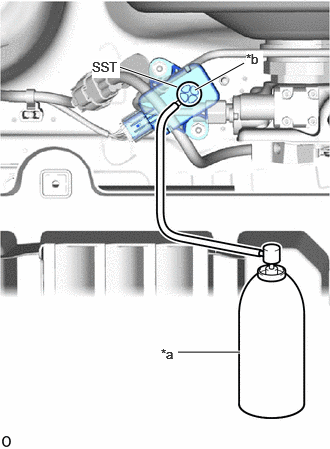
| *a | Hydrogen Gas for Inspection |
| *b | Hydrogen Detecting Portion |
Cover the hydrogen detecting portion of the hydrogen detector with SST.
- SST
- 09405-62010 (09405-06010)
Check the tank area 2 hydrogen density displayed on the GTS while injecting hydrogen gas for 5 seconds or more.
- OK:
0.9 % or more
- NOTICE:
-
Use hydrogen gas at 1.3% concentration.
- HINT:
-
The value stabilizes approximately 5 seconds after hydrogen gas injection.
If the result is not as specified, replace the hydrogen detector.
Check without using the GTS
Put the engine in inspection mode.
| *a | Hydrogen Gas for Inspection |
| *b | Hydrogen Detecting Portion |
Cover the hydrogen detecting portion of the hydrogen detector with SST.
- SST
- 09405-62010 (09405-06010)
Inject hydrogen gas for 5 seconds or more and check the condition of the hazard warning lights and the sounding of the wireless buzzer.
- OK:
Detection Status Specified Condition Detected (check result is OK) ·Hazard warning light illuminates (each light turns on 6 times or more for 5 seconds)
·Wireless buzzer sounds (each buzzer sounds 6 times or more for 5 seconds)
Not detected (check result is NG) ·Hazard warning light does not illuminate
·Wireless buzzer does not sound
- NOTICE:
- ·
Use hydrogen gas at 1.3% concentration.
·Perform with the ignition switch ON, READY OFF, and the FC system stopped.
If the result is not as specified, replace the hydrogen detector.
Install the No. 1 floor under cover.