RM37H0E
_58
Vehicle Interior
_094007
POWER OUTLETS (INT)
_0491493
POWER OUTLET SOCKET(for Luggage Compartment)
A
POWER OUTLETS (INT) POWER OUTLET SOCKET(for Luggage Compartment) REMOVAL
CAUTION / NOTICE / HINT
COMPONENTS (REMOVAL)
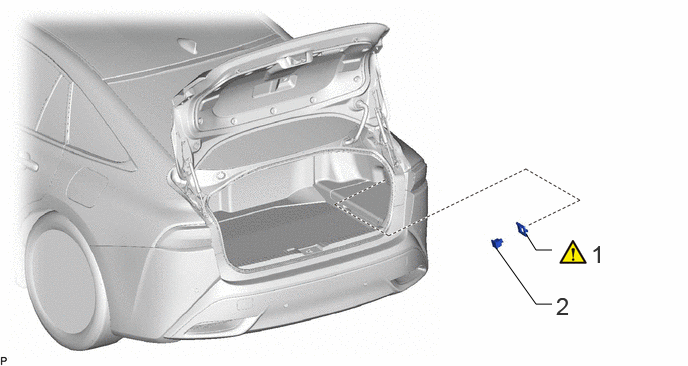
5.75,2.604 5.583,2.604
5.583,2.604 5.479,2.438
false
5.75,3.167 5.583,3.167
5.583,3.167 5.167,2.583
false
6.156,2.5 6.49,2.917
0.333,0.417
18
false
1
5.792,3.042 6.042,3.292
0.25,0.25
18
false
2
| Procedure | Part Name Code | 
|

|

|
|
|---|---|---|---|---|---|
| 1 | POWER OUTLET SOCKET BEZEL | 85536C | ( ) |
- | - |
| 2 | NO. 2 POWER OUTLET SOCKET | 85531A | - | - | - |
PROCEDURE

 85536C
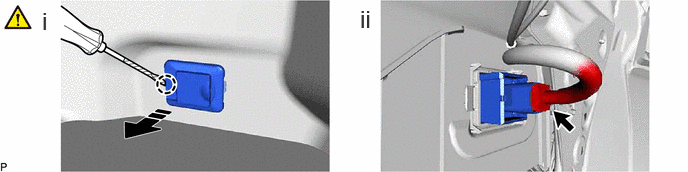
1.REMOVE POWER OUTLET SOCKET BEZEL
a.
0.438,0.073 0.688,0.406
0.25,0.333
18
false
i
3.75,0.052 4,0.385
0.25,0.333
18
false
ii

|
Pull Out Direction | - | - |
i.
Using a screwdriver with its tip wrapped with protective tape, detach the claw and pull out the power outlet socket bezel.
ii.
Disconnect the No. 2 power outlet socket connector and remove the power outlet socket bezel.
85531A
2.REMOVE NO. 2 POWER OUTLET SOCKET
a.

0,0 0,0
false
|
|
Removal Direction | - | - |