 |
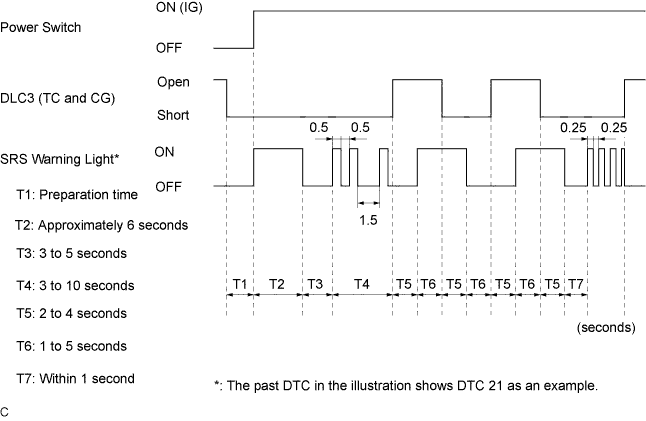
Check for DTCs (Present DTC).
Turn the power switch ON (IG), and wait for approximately 60 seconds.
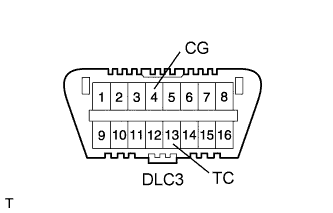
Using SST, connect terminals 13 (TC) and 4 (CG) of the DLC3.
- SST
- 09843-18040
- NOTICE:
- Connect the terminals to the correct positions to avoid a malfunction.
Check for DTCs (Past DTC).
Using SST, connect terminals 13 (TC) and 4 (CG) of the DLC3.
- SST
- 09843-18040
- NOTICE:
- Connect the terminals to the correct positions to avoid a malfunction.
Turn the power switch ON (IG), and wait for approximately 60 seconds.
 |
Read the DTCs.
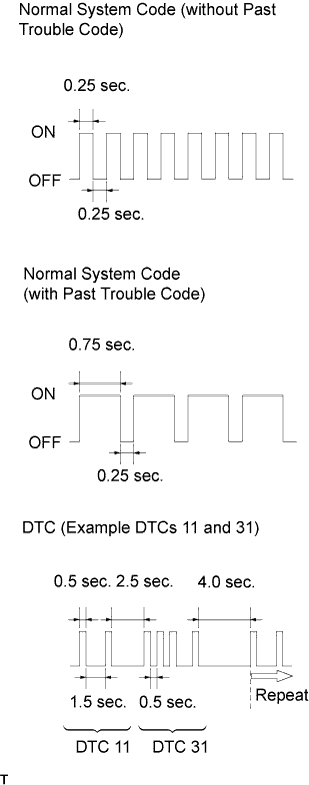
Read the blinking patterns of the DTCs. As examples, the blinking patterns for the normal system code and DTCs 11 and 31 are shown in the illustration.
- Normal system code indication (without past DTC)
The light blinks twice per second. - Normal system code indication (with past DTC)
When the past DTC is stored in the center airbag sensor, the light blinks once per second. - DTC indication
The first blinking pattern indicates the first digit DTC. The second blinking pattern occurs after a 1.5-second pause.
- HINT:
- If 2 or more malfunctions are found, the indication begins with the lowest numbered DTC.
- If DTCs are indicated without connecting the terminals, proceed to the "TC and CG Terminal Circuit" (Click here).
- Normal system code indication (without past DTC)