 |
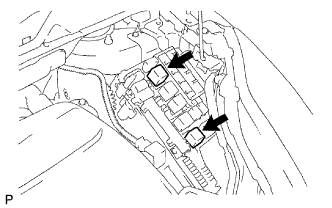
Remove and install the relays as shown in the illustration if instructed to remove and install No. 1 and No. 2 motor relays by the Techstream.
BRAKE FLUID > BLEEDING |
| 1. PREPARE FOR BLEEDING |
Move the shift lever to the P position and apply the parking brake.
Connect the Techstream to the DLC3 with the power switch OFF as shown in the illustration.
Turn the power switch ON (IG) and turn on the Techstream.
Enter the following menus: Chassis / ABS/VSC/TRC / Air Bleeding.
Select "AIR BLEEDING".
Select " Usual air bleeding" if the front/rear brakes were removed, installed or disassembled.
Select "Actuator has been removed" if the actuator is removed, installed or replaced.
Select "Master Cylinder or Stroke Simulator has been removed" if the brake master cylinder or the brake stroke simulator was removed, installed or replaced.
|
Remove and install the relays as shown in the illustration if instructed to remove and install No. 1 and No. 2 motor relays by the Techstream.
| 2. FILL RESERVOIR WITH BRAKE FLUID |
Add brake fluid into the reservoir.
| 3. BLEED AIR FROM MASTER CYLINDER |
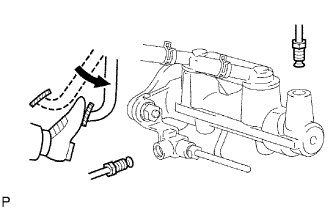 |
Disconnect the brake lines from the master cylinder.
Slowly depress and hold the brake pedal.
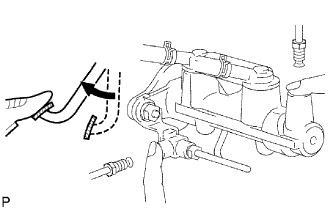 |
Cover the outer holes with your fingers, and release the brake pedal.
Repeat the above steps 3 or 4 times.
Connect the brake lines to the master cylinder.
| 4. BLEED AIR FROM FRONT AND REAR BRAKE SYSTEMS |
Remove the No. 1 and No. 2 motor relays.
Bleed the air out of the FR/FL wheels if the display appears.
Remove the bleeder plug cap.
Connect the vinyl tube to the bleeder plug.
Depress the brake pedal several times, then loosen the bleeder plug with the brake pedal depressed.
When the fluid stops coming out, tighten the bleeder plug, and then release the brake pedal.
Repeat the above steps until all the air in the fluid is completely bled out.
Install the bleeder plug cap.
Repeat the previous procedures to bleed the air out of the brake line for each wheel.
Install the No. 1 and No. 2 motor relays.
Bleed the air out of the RL wheel if the display appears.
Remove the bleeder plug cap of RL wheel.
Connect the vinyl tube to the bleeder plug of RL wheel.
Depress the brake pedal and loosen the bleeder plug of RL wheel until all the air in the fluid is completely bled out.
Tighten the bleeder plug if the air is completely bled out.
Bleed the air out of the RR wheel if the display appears.
Remove the bleeder plug cap of RR wheel.
Connect the vinyl tube to the bleeder plug of RR wheel.
Depress the brake pedal and loosen the bleeder plug of RR wheel until all the air in the fluid is completely bled out.
The air bleeding of the front and rear brake system finishes if the display appears.
| 5. BLEED AIR FROM BRAKE ACTUATOR |
Bleed the air out of the FR/FL wheels if the display appears.
Bleed the air out of the drain line.
Depress the brake pedal 30 times within 30 seconds while the solenoid is operating.
Install the No. 1 and No. 2 motor relays.
Bleed the air out of the rear brake RL wheel.
Bleed the air out of the rear brake RR wheel.
Loosen the bleeder plug of FL wheel.
Bleed the air out of the power supply line.
Tighten the bleeder plug of FL wheel.
Bleed the air out of the stroke simulator line.
Depress the brake pedal 20 times in 20 seconds.
Perform the usual air bleeding for the FL wheel.
Refresh the high pressure line.
Turn the power switch OFF. Turn the power switch ON (IG) and check if the ABS motor pump runs and stops.
Return to "MENU".
| 6. BLEED AIR FROM MASTER CYLINDER/STROKE SIMULATOR |
Remove the No. 1 and No. 2 motor relays.
Bleed the air out of the FR/FL wheels in accordance with the display.
Install the No. 1 and No. 2 motor relays.
Bleed the air out of the stroke simulator line.
Depress the brake pedal 20 times in 20 seconds.
Perform the usual air bleeding for the FL wheel.
The air bleeding of the master cylinder/stroke simulator finishes if the display appears.
| 7. CHECK AND CLEAR DTC |
Check and clear the DTC (Click here).