 |
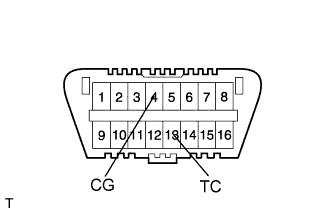
Using SST, connect terminals TC and CG of the DLC3.
- SST
- 09843-18040
Turn the power switch ON (READY).
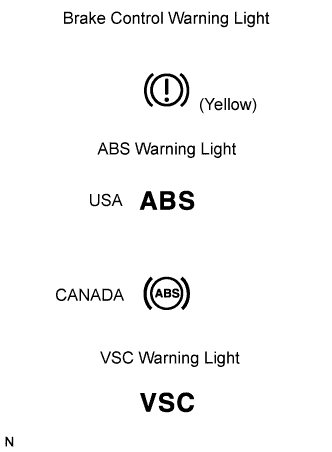 |
Read the DTC from the brake control warning light, ABS warning light and VSC warning light on the combination meter.
| Light | Read DTC |
| Brake control warning light | DTC of Electronically Controlled Brake system |
| ABS warning light | DTC of ABS system |
| VSC warning light | DTC of Enhanced VSC system |
- HINT:
- If no code appears, inspect the diagnostic circuit or ABS warning light circuit.
Trouble Area See procedure TC and CG terminal circuit Click here Brake control warning light circuit Click here or Click here ABS warning light circuit Click here or Click here VSC warning light circuit Click here or Click here
As an example, the illustration below shows the blinking patterns of the normal system code and trouble codes 11 and 21.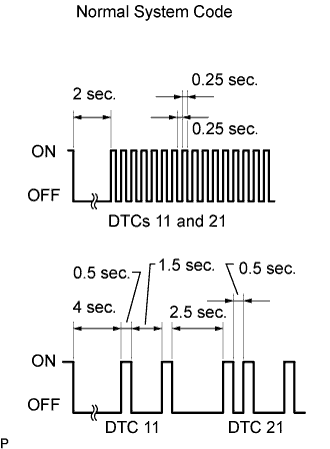
Codes are explained in the Diagnostic Trouble Code (Click here).
After completing the check, disconnect terminals TC and CG of the DLC3, and turn off the display.
If 2 or more DTCs are detected at the same time, the DTCs will be displayed in ascending order.