BRAKE PEDAL > ADJUSTMENT |
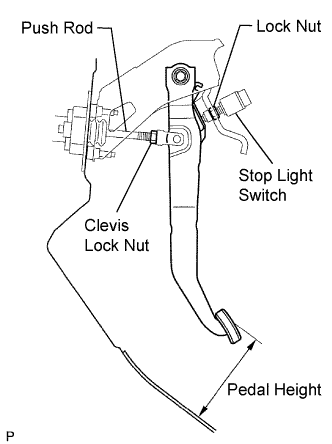
| 1. CHECK AND ADJUST BRAKE PEDAL HEIGHT |
|
Remove the lower instrument panel finish panel .
Inspect brake pedal height.
Adjust brake pedal height.
Disconnect the connector from the stop light switch.
Loosen the stop light switch lock nut. Turn the switch in order to give the pedal some free play.
Loosen the clevis lock nut. Turn the push rod and adjust the pedal height.
Tighten the clevis lock nut.
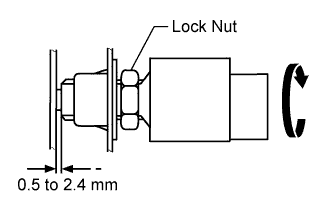 |
Turn the stop light switch so that the clearance between its thread portion tip and the area where the pedal makes contact is between 0.5 to 2.4 mm (0.020 to 0.095 in.). Tighten the lock nut.
Connect the connector to the stop light switch.
Connect the Techstream to the DLC3.
Loosen the stroke sensor set bolts.
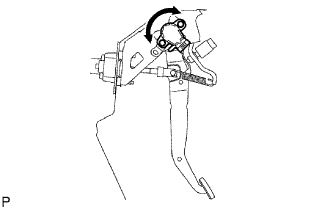 |
Turn the power switch ON (IG). Read the stroke sensor value displayed on the data monitor using the Techstream. Slowly turn the stroke sensor to the right and left to adjust it to the standard value.
Tighten the stroke sensor set bolts.
Carry out system initialization (Click here).
Install lower instrument panel finish panel .
| 2. CHECK BRAKE PEDAL FREE PLAY |
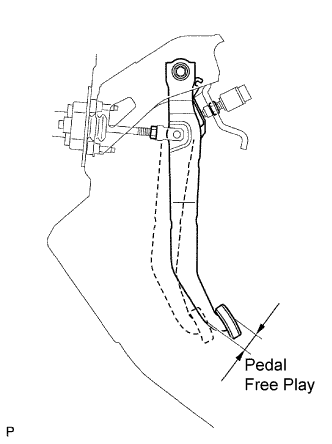 |
Depress the brake pedal several times strongly after the engine stops.
Check the brake pedal free play.
Check the stop light switch clearance.
| 3. CHECK BRAKE PEDAL RESERVE DISTANCE |
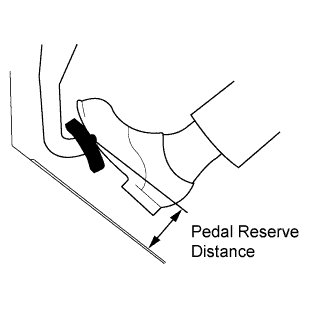 |
Release the parking brake pedal.
With engine running, depress the pedal and measure the pedal reserve distance, as shown in the illustration.