Clear stored value of initialization of linear solenoid valve and calibration.
Connect Techstream to the DLC3 with the power switch OFF.
Turn the power switch ON (IG) with the brake pedal released.
Check that the P position switch indicator (P) is on.
Perform the Reset Memory function under the ABS/VSC/TRAC menu.
Perform initialization of linear solenoid valve.
Perform zero point calibration of yaw rate and deceleration sensor (Click here).
Perform initialization of linear solenoid valve and calibration.
Connect Techstream to the DLC3 with the power switch OFF.
Turn the power switch ON (IG) with the brake pedal released.
Check that the main switch (parking switch) indicator (P) is on.
Turn the power switch ON (IG) with the brake pedal depressed to display the READY indicator on the meter.
Select the ECB* Utility following the Techstream screen.
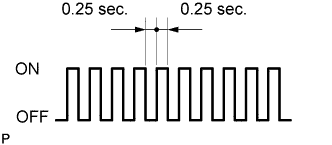
*: Electronically Controlled BrakeLeave the vehicle stationary without depressing the brake pedal for 1 to 2 minutes. Check that the interval between blinks of the brake control warning light (BRAKE warning (Yellow)) changes from 1 second to 0.25 seconds.
- NOTICE:
- Leave the meter's READY indicator on during the initialization of linear solenoid valve and calibration. Do not drive the vehicle or depress the brake pedal.
- A DTC that indicates trouble with initialization of linear solenoid valve and calibration is stored if entering the Test Mode with the shift lever in any position other than P.
- HINT:
- The time needed to complete initialization of linear solenoid valve and calibration varies depending on battery voltage.
- The brake control warning light (BRAKE warning (Yellow)) blinks at 1 second intervals during the initialization of linear solenoid valve and calibration and changes to the Test Mode display when it is completed.
- The brake control warning light (BRAKE warning (Yellow)) blinks at 0.25 second intervals if the Test Mode is normal.
Check that DTC C1346/66 that indicates trouble with stroke sensor zero point learning is not output when the brake control warning light changes to the Test Mode display upon initialization of linear solenoid valve and calibration completion.
Enter the Normal Mode from the Signal Check following the Techstream screen.
 |