Home › BRAKE › BRAKE CONTROL › BRAKE PEDAL STROKE SENSOR

BRAKE PEDAL STROKE SENSOR > INSTALLATION

for Preparation Click here


1. INSTALL BRAKE PEDAL STROKE SENSOR ASSEMBLY


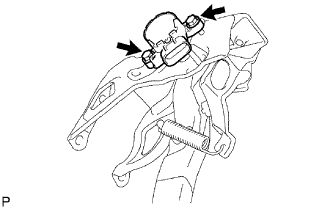
  1. When installing a new brake pedal stroke sensor:


      F046144E01
    1. Install the sensor to the brake pedal support with the 2 bolts.

      Torque:
      9.3 N*m{ 95 kgf*cm , 82 in.*lbf }

      NOTICE:
      1. Engage the sensor lever with the brake pedal groove.
      2. Check that there is no foreign matter attached to the sensor's contacting surface.

    2. Strongly depress the brake pedal and break the sensor lever set pin.

    3. Remove the broken sensor lever set pin.

    4. Connect the sensor connector.


  1. When reusing the brake pedal stroke sensor:


      F046144E01
    1. Temporarily install the sensor to the brake pedal support with the 2 bolts.

      NOTICE:
      1. Engage the sensor lever with the brake pedal groove.
      2. Check that there is no foreign matter attached to the sensor's contacting surface.

    2. Connect the Techstream to the DLC3.

    3. Connect the sensor connector.


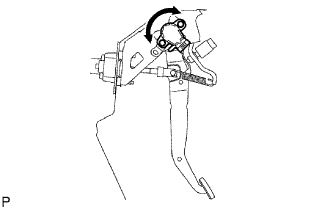
    4. F046139E01
    5. Turn the power switch ON (IG). Reading the stroke sensor 1 value, turn the sensor slowly to the right and left to adjust it to the standard value.

      Standard voltage:
      0.8 to 1.2 V


    6. F046144E01
    7. Tighten the 2 bolts.

      Torque:
      9.3 N*m{ 95 kgf*cm , 82 in.*lbf }

      NOTICE:
      Do not depress the brake pedal after turning the power switch ON (IG).

  1. Carry out system initialization (Click here).


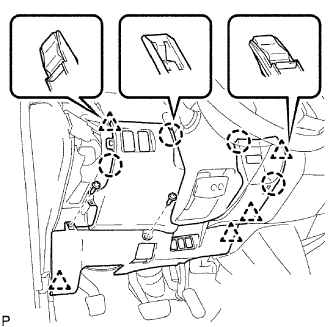
2. INSTALL LOWER INSTRUMENT PANEL FINISH PANEL SUB-ASSEMBLY


B074045E03
  1. Connect the connectors.

  1. Attach the 4 claws and 5 clips to install the instrument panel finish panel.

  1. Connect the hood lock control cable.

  1. Install the 2 screws.


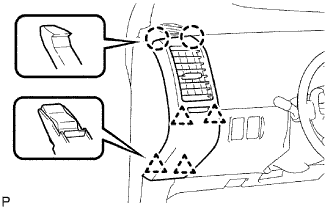
3. INSTALL NO. 1 INSTRUMENT PANEL REGISTER ASSEMBLY


B074044E03
  1. Attach the 2 claws and 4 clips to install the instrument panel register.