METER / GAUGE / DISPLAY METER / GAUGE SYSTEM GENERAL/CONTROL/DETAILS DETAILS
OPERATING CONDITION
Hybrid System Indicator Operation Condition
Hybrid System Indicator is activated when the following conditions are met.
| Condition | ·
Turn the power switch (push start switch) to on (IG). ·
READY ON state ·
The shift position is in D or B. |
SYSTEM CONTROL
Seat Belt Warning
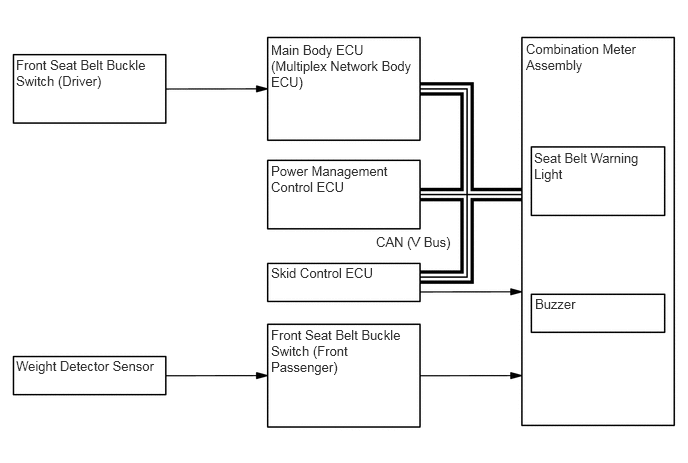
When the power switch (push start switch) is on (IG), this system detects the condition of the seat belts based on the signals from the front seat belt buckle switch (driver and front passenger) and the weight detector sensor.
The seat belt warning light located in the combination meter assembly is used for both the driver and front passenger seats.
After the power switch (push start switch) is turned on (IG), if the driver or front passenger has not fastened their seat belt, the seat belt warning light will begin flashing.
When the seat belt remains unfastened and the vehicle speed reaches approximately 20 km/h (12.4 mph), the seat belt warning buzzer will start sounding intermittently. At this time, the seat belt warning light flashing will change in sync with the intermittent buzzer sound. These buzzer and indicator warnings will continue for approximately 30 seconds until the seat belt is fastened.
If the seat belt still remains unfastened over the approximately 30 seconds, the intervals of the intermittent buzzer sound and flashing light will change, and such warnings will continue for approximately 90 seconds until the seat belt is fastened.
While the seat belt warning light and buzzer are operating, fastening the seat belt will bring them to a stop.
FUNCTION
Combination Meter
The table below shows the combination meter function:
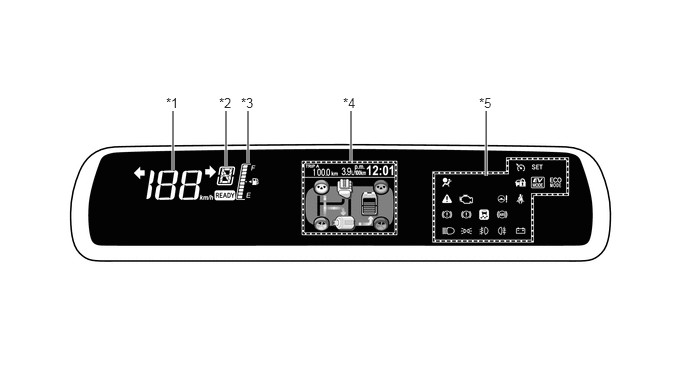
| Function | Outline | |
|---|---|---|
| *1 | Speedometer | Digitally displays the vehicle speed signal in MPH or km/h. |
| *2 | Shift Position Indicator | Displays the shift position. |
| *3 | Fuel Gauge | Displays the remaining fuel amount. Also, displays the indication clearly when cornering or driving on a steep slope by using a software application capable of suppressing any indication deviations. |
| *4 | Multi-information Display | Displays the eco drive monitor, odometer, clock and warning messages etc. |
| *5 | Indicator and Warning Lights | Come on or blink to warn the driver. |
| - | Buzzers | Sound to warn the driver. |
Multi-information Display
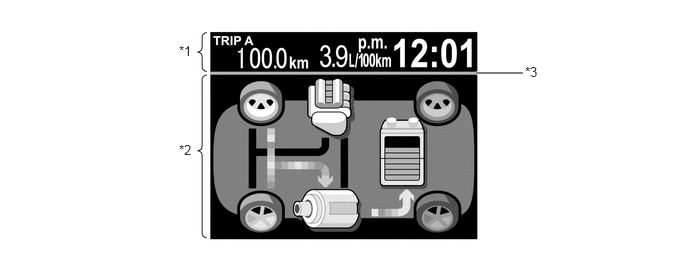
The multi-information display consists of a constant display area (see *1 in the illustration below) and content display area (see *2 in the illustration below).
| Function | Outline | Display Area |
|---|---|---|
| Opening | System activation animation will be displayed for approximately 3 seconds when the power switch (push start switch) is turned on (IG). | All |
| Eco Drive Monitor | Energy Monitor, Drive Information, ECO Score, 5min Consumption, ECO Savings, ECO Savings Record, Past Record, and Settings & Screen Off can be selected. | *2 |
| Warning Message | Warning messages interrupt the displayed information to warn the diver. | *2 |
| Clock | Time is displayed. | *1 |
| Odometer / Trip Meter | A travel distance is displayed in the odometer, trip meter A and trip meter B respectively. | *1 |
| Average Fuel Consumption | Average fuel consumption is calculated based on the distance the vehicle has run and the amount of fuel the vehicle has consumed, and then the calculation result is displayed. | *1 |
| Ending | System deactivation animation will be displayed for approximately 3 seconds when the power switch (push start switch) is turned off. | All |
| Cruising Data | After the ending screen, pieces of information such as a travel distance, time and fuel consumption are displayed. | *2 |
| Color Line | The color line varies depending on the content. -
Green: Energy Monitor, Drive Information and ECO Score -
Pink: ECO Savings and ECO Savings Record -
Blue: 5min Consumption and Past Record -
Orange: Settings & Screen Off and Warning Message |
*3 |
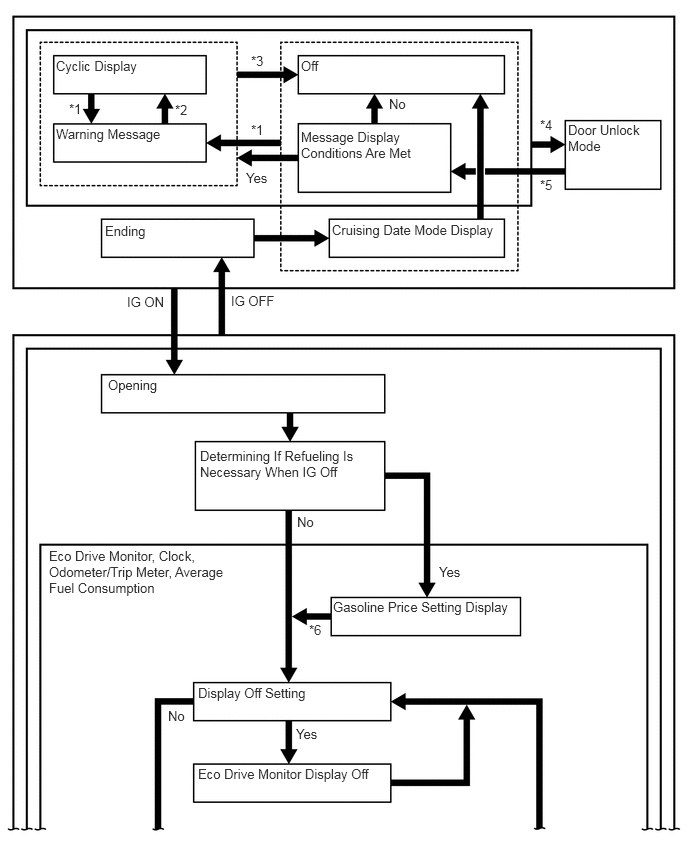
The multi-information display flow can be switched as shown in the flow chart below:
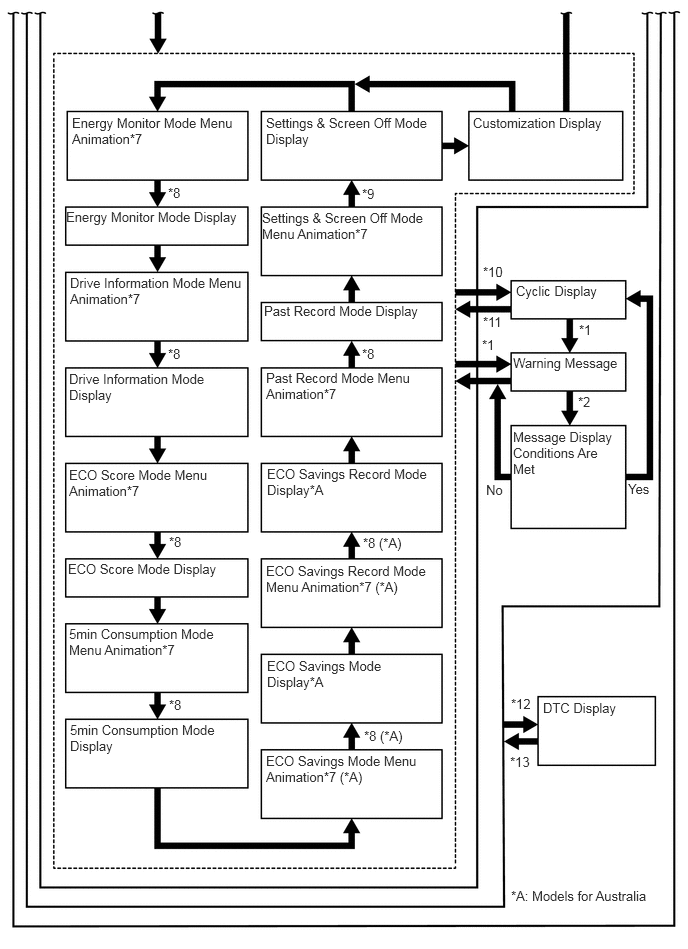
| No. | Transition Condition |
|---|---|
| *1 | Warning message display conditions are met. |
| *2 | All warning message displays have finished or All warning message display conditions are canceled. |
| *3 | Warning message display conditions are canceled. |
| *4 | Door unlock mode transition conditions are met. |
| *5 | Door unlock mode settings have been completed. |
| *6 | No switch operation has been made for more than approximately 5 seconds. |
| *7 | The mode the power switch (push start switch) was turned off the last time will resume when the power switch (push start switch) is turned on (IG). If the mode was Settings & Screen Off when the power switch (push start switch) was turned off the last time, Energy Monitor mode will start from. |
| *8 | The mode display will change after approximately 1.5 seconds of the DISP switch being released. |
| *9 | DISP switch being pressed and held. |
| *10 | The warning message display conditions are met and the DISP switch has not been operated for approximately 10 seconds. |
| *11 | All warning message display conditions are canceled. |
| *12 | DTC display transition conditions are met. |
| *13 | DTC display transition conditions are canceled. |
Eco Drive Monitor
The eco drive monitor is displayed in the following order each time the DISP switch of the steering pad switch assembly is pressed.
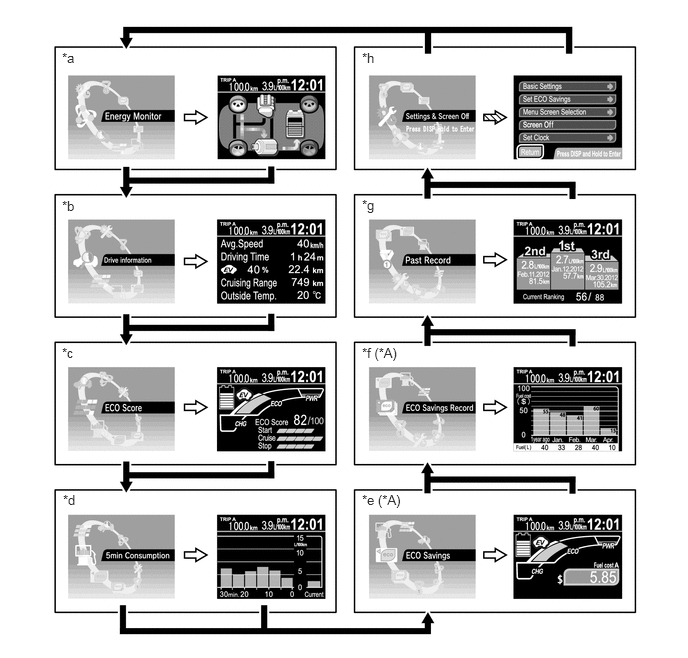
| *A | Models for Australia | - | - |
| *a | Energy Monitor | *b | Drive Information |
| *c | ECO Score | *d | 5min Consumption |
| *e | ECO Savings | *f | ECO Savings Record |
| *g | Past Record | *h | Settings & Screen Off |

|
DISP switch being pressed briefly. | 
|
Mode display will change after 1.5 seconds of DISP switch being released. |

|
DISP switch being pressed and held. | - | - |
The table below shows the eco drive monitor function:
| Display Mode | Display | Outline |
|---|---|---|
| Energy Monitor | 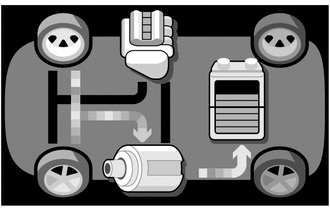
|
·
Shows the energy flow in the form of an arrow. -
Engine to Tire -
Engine to Motor -
Motor to Tire -
Tire to Motor -
Motor to Battery -
Battery to Motor ·
Shows the State Of Charge (SOC) of the HV battery in 8 levels. |
| Drive Information | 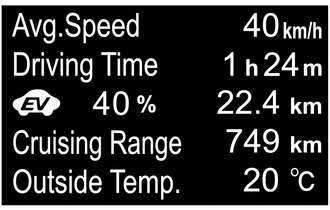
|
Shows the pieces of information listed below -
Average Speed -
Driving Time -
EV Drive Ratio -
EV Traveling Distance -
Cruising Range -
Outside Temperature |
| ECO Score | 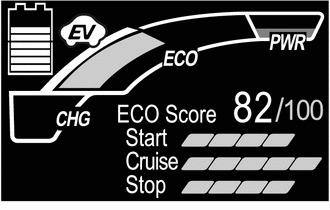
|
·
ECO Score: For every driving cycle that is from a start to a stop, the respective driving conditions of Start, Cruise and Stop are put into calculation to evaluate them, scoring how much the driving control is eco-friendly. Values obtained in this mode do not link to values in ECO Savings mode. ·
Start: The driving operating conditions, when the vehicle begins to move, are shown in bar graph to indicate how much they are eco-friendly. ·
Cruise: The driving operating conditions, when the vehicle runs at constant speeds, are shown in bar graph to indicate how much they are eco-friendly. ·
Stop: The driving operating conditions, when the vehicle decreases to stop, are shown in bar graph to indicate how much they are eco-friendly. ·
Since Hybrid System Indicator is provided on the same display screen, the driver can see if their driving controls are appropriate to achieve eco-friendly drive further. ·
Scores will be affected by external circumstances such as road conditions or surrounding environment. However, driving conditions while the cruise control system is active or the shift lever is in N will not be scored. |
| 5min Consumption | 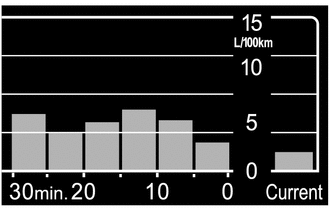
|
·
The average fuel consumption, at 5-minute intervals, is calculated from the distance the vehicle has traveled for 5 minutes and the amount of fuel the vehicle has consumed for that travel distance, and the calculation result is expressed with bar graphs. ·
The momentary fuel consumption is calculated from the travel distance per 20 engine revolutions and the amount of fuel consumed for that travel distance, and the calculation result is expressed with bar graphs. |
| ECO Savings (Models for Australia)*1 | Gasoline Price / Basic*2 | |
|
·
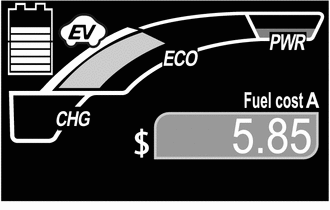
The total cost of the gasoline consumption corresponding to the travel distance the vehicle actually has been driven is calculated, and then the calculation result is displayed.*4 ·
Since Hybrid System Indicator is provided on the same display screen, the driver can see if their driving controls are appropriate to achieve eco-friendly drive further. |
|
| Gasoline Price / Details*2 | ||
|
·
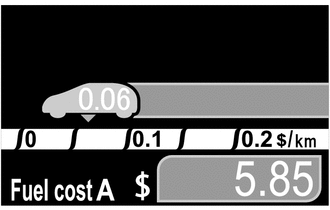
The pictogram representing the driver's vehicle shows the fuel consumption cost for a travel distance per unit, and the pictogram moves left or right to express the extent of gasoline consumption amount. (The closer to the left it moves, the less the gasoline is consumed.) ·
The gasoline consumption cost same as that of the basic display described above is shown.*4 |
|
| Fuel Consumption Comparison*3 / Basic*2 | ||
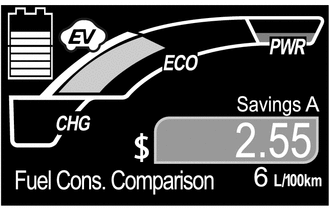
|
·
The fuel cost difference is calculated by comparing the gasoline consumption cost corresponding to the travel distance the vehicle has actually run with the gasoline consumption cost of the comparison vehicle corresponding to the same travel distance, and then the calculation result is displayed. ·
Since Hybrid System Indicator is provided on the same display screen, the driver can see if their driving controls are appropriate to achieve eco-friendly drive further. |
|
| Fuel Consumption Comparison*3 / Details*2 | ||
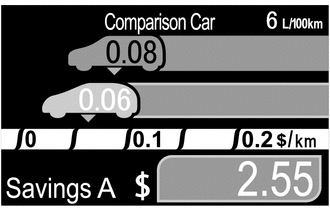
|
·
The pictogram that represents the comparison vehicle shows the gasoline consumption cost for a travel distance per unit, and the pictogram remains at the reading position. ·
The pictogram that represents the driver's vehicle shows the fuel consumption cost for a travel distance per unit, and the pictogram moves left or right to express the extent of gasoline consumption difference in comparison with another vehicle. (The closer to the left it moves, the less the gasoline is consumed.) ·
The gasoline consumption comparison cost same as that of the basic display described above is shown. |
|
| ECO Savings Record (Models for Australia)*5 | Gasoline Price | |
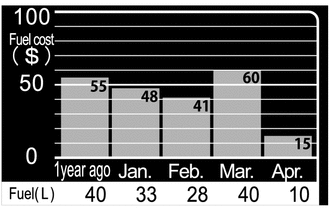
|
The gasoline consumption cost for the current month, last month, 2 months ago, 3 months ago, and 1 year ago is shown in bar graph, and the monthly fuel consumption amounts are shown by quantity. | |
| Fuel Consumption Comparison | ||
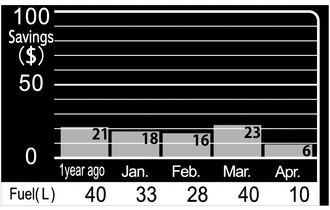
|
The difference of the gasoline consumption costs between the driver's vehicle and comparison vehicle for the current month, last month, 2 months ago, 3 months ago, and 1 year ago is shown in bar graph, and the monthly fuel consumption amounts are shown by quantity. | |
| Past Record*6 | Own Best | |
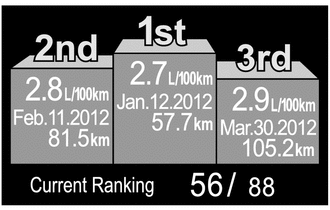
|
·
The average fuel consumption performances are ranked in the 1st, 2nd and 3rd among the records, and the respective fuel efficiency value, date and travel distance are also displayed. ·
In addition, when the current performance is within the top 100, the current rank is shown. If the performance is ranked outside the top 100, "Outside Ranking" is displayed. |
|
| Monthly Average | ||
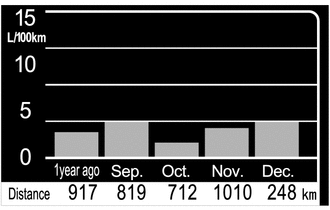
|
·
The monthly average fuel consumption for the current month, last month, 2 months ago, 3 months ago, and 1 year ago, is displayed with bar graphs. ·
The monthly travel distances are also displayed. |
|
| Settings & Screen Off | 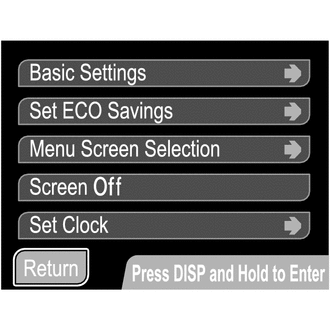
|
·
Allows for setting the preferred multi-information display. ·
Turns on and off the eco drive monitor. |
- HINT:
-
*1: Values obtained in this mode do not link to values in ECO Score mode.
-
*2: In Settings & Screen Off mode, the Gasoline Price screen and the Fuel Consumption Comparison screen can be switched to either of the displays, Basic or Details.
-
*3: If a comparison fuel efficiency value is not set, the Fuel Consumption Comparison screen will not be active.
-
*4: The displayed gasoline price will not be identical to the actual gasoline price.
-
*5: The values cannot be reset.
-
*6: If any one of the fuel consumption values in the odometer, trip meter A or trip meter B are reset, all the fuel consumption values in the meters will be reset together.
Hybrid System Indicator
Hybrid System Indicator will appear when ECO Score mode or ECO Savings mode is selected in the eco drive monitor.
Hybrid System Indicator displays the total of the HV battery and engine output as the hybrid system output.
The scale for Hybrid System Indicator consists of the 3 indicators (Charge, Eco, Power). The role of each indicator is as follows.

| Indicator | Function | |
|---|---|---|
| *1 | Charge (CHG) | This shows that energy regeneration is occurring. |
| *2 | Eco | This indicator is active while the vehicle is driven eco-friendly. |
| *3 | Eco (Hybrid Eco) | This indicator shows that the vehicle is driven in a manner that promotes frequent motor only operation. (Based on the driving conditions, the power management ECU determines if the engine should be stopped to enhance fuel efficiency.) |
| *4 | Power (PWR) | This indicator is on while the drive power is exceeding the eco-friendly driving range (during full power driving etc.). |
Settings & Screen Off
To enter the detail setup screen from the Settings & Screen Off screen, the DISP switch needs to be pressed and held.
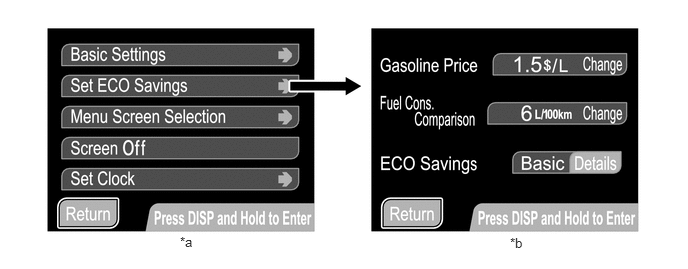
| *a | Settings & Screen Off | *b | Set ECO Savings |
|
|
DISP switch being pressed and held. | - | - |
Settings & Screen Off mode has the setup items listed below. For the Basic Settings, Set ECO Savings and Menu Screen Selection, those can be changed when the vehicle is stationary or the vehicle speed is approximately 8 km/h (5 mph) or less.
| Item | Customizing Value | |
|---|---|---|
| Basic Settings | Date | Adjusts a date. |
| Clock | Adjusts a clock. | |
| Clock Mode | Selects the 12/24 hour time display mode. | |
| Steering Switch | Selects the touch tracer display on/off mode. | |
| Language | Selects the display language. | |
| Set ECO Savings* | Gasoline Price | Used to set a gasoline price. |
| Fuel Cons. Comparison | Used to set fuel consumption of a comparison vehicle. | |
| ECO Savings | Selects the ECO Savings Basic/Details mode. | |
| Menu Screen Selection | ECO Savings Record | Selects the ECO Savings Record on/off mode. |
| 5 min. consumption | Selects the 5 min. consumption on/off mode. | |
| Past Record | Changes the Past Record screens. | |
| Screen Off | Turns on/off the eco drive monitor. | |
| Set Clock | Adjusts a clock. | |
*: Models for Australia
Warning Message
When a warning is necessary, the warning display interrupts the display in the multi-information display.
The master warning light may illuminate or blink and the buzzer in the combination meter assembly may sound depending on the item in the multi-information display.
When multiple warning conditions occur at the same time, the highest priority warning message is displayed first. After 2 seconds has elapsed, the next highest priority warning message will be shown. Unless the causes of warnings are removed, the respective warning messages continue.
| Priority | Warning Message | Master Warning Light | Buzzer |
|---|---|---|---|
| 1 | MAINTENANCE MODE | - | - |
| CERTIFICATION MODE | - | - | |
| 2 | AUTO POWER OFF TO CONSERVE BATTERY | - | - |
| 3 | SHIFT TO P POSITION | Blinks | Sounds |
| SHIFT TO P POSITION WHEN PARKED | Blinks | Sounds | |
| TRACTION BATTERY PRESERVATION MODE RESTART AFTER SHIFTING THE P POSITION | Blinks | Sounds | |
| N POSITION | Blinks | Sounds | |
| 4 | LOW TRACTION BATTERY CHARGE WHEN NOT IN N POSITION | Blinks | Sounds |
| RELEASE PARKING BRAKE | Blinks | Sounds | |
| KEY NOT DETECTED | Blinks | Sounds | |
| 5 | CHECK HYBRID SYSTEM | Illuminates | Sounds |
| CHECK CRUISE CONTROL SYSTEM | Illuminates | Sounds | |
| ENGINE OIL PRESSURE LOW | Illuminates | Sounds | |
| CHECK HYBRID SYSTEM STOP THE VEHICLE IN A SAFE PLACE IMMEDIATELY | Illuminates | - / Sounds*1 | |
| 6 | TURN POWER OFF | Blinks | Sounds |
| KEY DETECTED IN VEHICLE | Blinks | Sounds | |
| TURN LIGHTS OFF | Blinks | Sounds | |
| DEPRESS BRAKE PEDAL, TOUCH POWER SWITCH WITH KEY | Blinks | Sounds | |
| DEPRESS BRAKE PEDAL AND PUSH POWER SWITCH TO START | Blinks | Sounds | |
| SHIFT TO P POSITION TO START | Blinks | Sounds | |
| 7 | STEERING LOCK ACTIVE | Blinks | Sounds |
| SHIFT TO P POSITION TO START | Blinks | Sounds | |
| 8 | KEY BATTERY LOW | Illuminates | Sounds |
| CHECK HEADLIGHT LEVELING SYSTEM*2 | Illuminates | Sounds | |
| HYBRID SYSTEM OVER HEAT OUTPUT POWER IS LIMITED | Illuminates | Sounds | |
| 9 | POWER ON | - | - |
| EV MODE CURRENTLY NOT AVAILABLE | - | Sounds | |
| EV MODE NOT AVAILABLE WARMING UP | - | Sounds | |
| EV MODE NOT AVAILABLE LOW BATTERY | - | Sounds | |
| EV MODE NOT AVAILABLE EXCESSIVE SPEED | - | Sounds | |
| EV MODE NOT AVAILABLE EXCESSIVE ACCELERATION | - | Sounds | |
| EV MODE DEACTIVATED | - | Sounds | |
| EV MODE DEACTIVATED LOW BATTERY | - | Sounds | |
| EV MODE DEACTIVATED EXCESSIVE SPEED | - | Sounds | |
| EV MODE DEACTIVATED EXCESSIVE ACCELERATION | - | Sounds |
- HINT:
-
*1: Depending on the abnormality, the buzzer may sound.
-
*2: Models with auto leveling system
Buzzer
The table below shows the warning and reminder functions of the buzzer in the combination meter assembly:
| Priority | Item | Priority | Item |
|---|---|---|---|
| 1 | READY | 2 | Driver Side Seat Belt Warning (a maximum of 5 times) |
| 3 | Driver Side Seat Belt Warning (Once) | 4 | Passenger Side Seat Belt Warning (Once) |
| 5 | Seat Belt Warning (Level 2) | 6 | Seat Belt Warning (Level 1) |
| 7 | Brake System Warning | 8 | EPS Warning |
| 9 | Door Open Warning When Not in P Position | 10 | Smart Entry and Start System Warning (Intermittent) |
| 11 | Key Reminder | 12 | Brake Operation Active Check Indication |
| 13 | Hill-start Assist Control Indication (Reset) | 14 | Hill-start Assist Control Indication (Set) |
| 15 | Smart Entry and Start System Warning (Intermittent 2) | 16 | Smart Entry and Start System Warning (Once) |
| 17 | Low Fuel Indicator | 18 | Multi-information Display Warning |
| 19 | Accelerator Depression with Neutral (N) Selected | 20 | Hybrid System Warning (Intermittent) |
| 21 | HV Battery Low Warning | 22 | Hybrid System Warning (Once) |
| 23 | HV Battery Charge Request | 24 | Hybrid System Overheat Warning |
| 25 | P Position Request at Start | 26 | Immobiliser Certification Reminder |
| 27 | Parking Brake Engaged Warning | 28 | Door Open while Driving Warning |
| 29 | EV Drive Mode Reject Warning | 30 | Light Reminder |
| 31 | Turn Flasher Sound | - | - |
Dimming Mode Display
The brightness of the combination meter assembly can be adjusted when the taillights are turned on.
While the dimming mode is displayed, the brightness of the meter can be changed by pressing the TRIP switch for 0.8 seconds or more. The brightness of the meter can be adjusted in 4 levels.
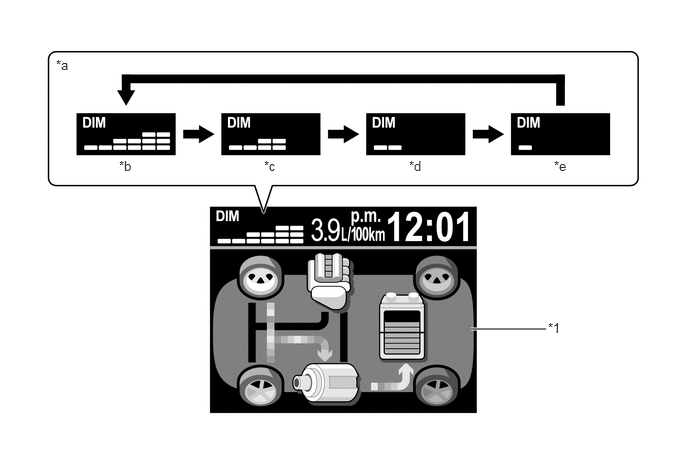
| *1 | Multi-information Display | - | - |
| *a | Dimming Mode | *b | 100% |
| *c | 12.5% | *d | 6.25% |
| *e | 3.125% | - | - |
CONSTRUCTION
Steering Pad Switch Assembly
A touch sensor is provided on the following frequently used switches such as the multi-information display, audio system and air conditioning system switches. The touch tracer display is displayed when any of the switches is touched by the driver's finger, and the switch is activated when pressed.
| Steering Pad Switch Assembly | Touch Sensor | |
|---|---|---|
| Audio System | Volume Switch (+) | Equipped |
| Volume Switch (-) | Equipped | |
| MODE Switch | Equipped | |
| Seek Switch (Up) | Equipped | |
| Seek Switch (Down) | Equipped | |
| Multi-information Display | TRIP Switch | Equipped |
| DISP Switch | Equipped | |
| Air Conditioning System | Air Inlet Control Switch | Equipped |
| TEMP Switch (Up) | Equipped | |
| TEMP Switch (Down) | Equipped | |
| Bluetooth Hands-free System | Voice Switch | Not equipped |
| On Hook Switch | Not equipped | |
| Off Hook Switch | Not equipped | |
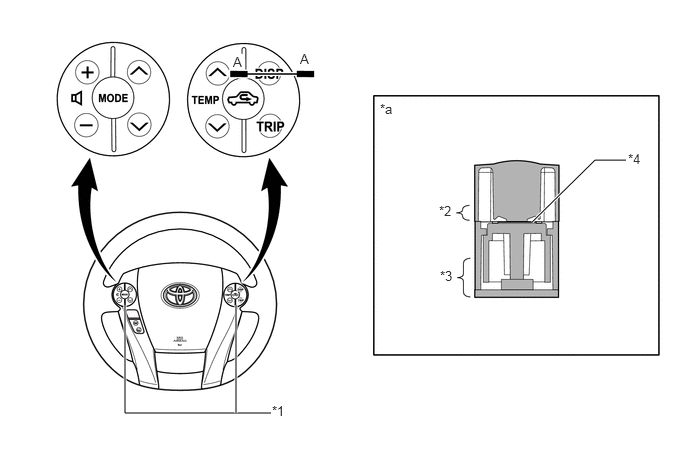
| *1 | Steering Pad Switch Assembly | *2 | Touch Switch Area |
| *3 | Function Switch Area | *4 | Touch Sensor |
| *a | A-A Cross Section | - | - |