NAVIGATION / MULTI INFO DISPLAY NAVIGATION ECU REMOVAL
PROCEDURE

 1. PRECAUTION
- NOTICE:
-
After turning the power switch off, waiting time may be required before disconnecting the cable from the negative (-) auxiliary battery terminal. Therefore, make sure to read the disconnecting the cable from the negative (-) auxiliary battery terminal notices before proceeding with work (See page General>INTRODUCTION>REPAIR INSTRUCTION>PRECAUTION).
58410B
2.REMOVE DECK BOARD ASSEMBLY
58411A
3.REMOVE NO. 1 DECK BOARD
58412A
4.REMOVE NO. 2 DECK BOARD
64993
5.REMOVE REAR DECK FLOOR BOX
64995
6.REMOVE DECK FLOOR BOX RH
7.DISCONNECT CABLE FROM NEGATIVE AUXILIARY BATTERY TERMINAL
- NOTICE:
-
When disconnecting the cable, some systems need to be initialized after the cable is reconnected (See page General>INTRODUCTION>REPAIR INSTRUCTION>INITIALIZATION).
8.REMOVE INTEGRATION CONTROL AND PANEL
55440D
9.REMOVE INSTRUMENT PANEL BOX ASSEMBLY
10.REMOVE CENTER INSTRUMENT PANEL REGISTER ASSEMBLY
11.REMOVE RADIO AND DISPLAY RECEIVER ASSEMBLY WITH BRACKET
86842
12.REMOVE NO. 1 NAVIGATION WIRE
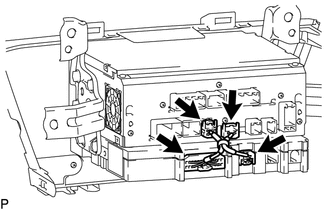
Disconnect each connector to remove the No. 1 navigation wire.
86101M
13.REMOVE ANTENNA CORD SUB-ASSEMBLY
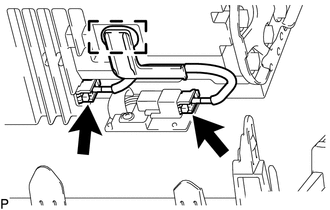
Disengage the clamp.
Disconnect the 2 connectors to remove the antenna cord sub-assembly.
86211J
14.REMOVE NO. 1 RADIO RECEIVER BRACKET
86212C
15.REMOVE NO. 2 RADIO RECEIVER BRACKET
86841
16.REMOVE NAVIGATION ECU