RM2070E
_56
Audio / Visual / Telematics
_061932
NAVIGATION / MULTI INFO DISPLAY
_0301740
NAVIGATION SYSTEM(for Navigation Receiver Type)
J
NAVIGATION / MULTI INFO DISPLAY NAVIGATION SYSTEM(for Navigation Receiver Type) Display does not Dim when Light Control Switch is Turned ON
PROCEDURE
1.CHECK IMAGE QUALITY SETTING
a.
Turn the light control switch to the tail or head position.
b.
Check that the daytime screen setting on the display adjustment screen is set to on.
- Result:
Result Proceed to Daytime screen setting is set to on. A Daytime screen setting is set to off. B
A
CHANGE DAYTIME SCREEN SETTING TO OFF
B
2.CHECK VEHICLE SIGNAL (OPERATION CHECK)
2.CHECK VEHICLE SIGNAL (OPERATION CHECK)
a.
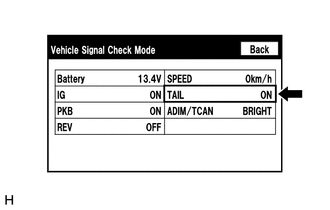
Enter the "Vehicle Signal Check Mode" screen.
Refer to Check Vehicle Signal in Operation Check (See page Audio / Visual / Telematics>NAVIGATION / MULTI INFO DISPLAY>NAVIGATION SYSTEM(for Navigation Receiver Type)>OPERATION CHECK).
b.
Check that the display changes between ON and OFF according to the light control switch operation.
- OK:
Light Control Switch Display Tail or head ON Off OFF
- HINT:
-
The display is updated once per second. It is normal for the display to lag behind the actual switch operation.
OK
REPLACE NAVIGATION RECEIVER ASSEMBLY
NG
PROCEED TO NEXT SUSPECTED AREA SHOWN IN PROBLEM SYMPTOMS TABLE