| NG |  |
| Go to step 2 |
NAVIGATION SYSTEM > Vehicle Position Mark Deviates Greatly |
| 1.CHECK CABIN |
Check the cabin for any object that might interrupt radio reception on the instrument panel. If such an object exists, remove it and check if the vehicle position mark returns to the appropriate position.
|
| ||||
| OK | ||
 | ||
| ||
| 2.CHECK SURROUNDINGS |
Check if the vehicle is in a location where GPS signal reception is poor. If the vehicle is in such a location, move the vehicle and check if the vehicle position mark returns to the appropriate position.
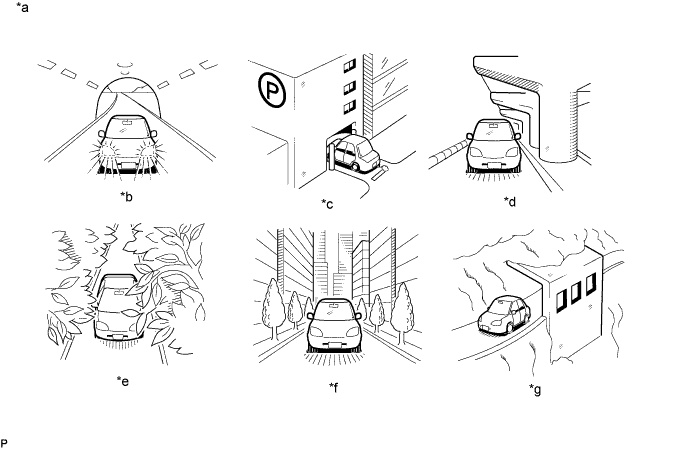
| *a | Example | *b | In a tunnel |
| *c | In a building | *d | Under an overpass |
| *e | On a forest or tree-lined path | *f | Between tall buildings |
| *g | Under a cliff or overhang | - | - |
|
| ||||
| OK | ||
| ||
| ||
| 3.CHECK GPS INFORMATION (OPERATION CHECK) |
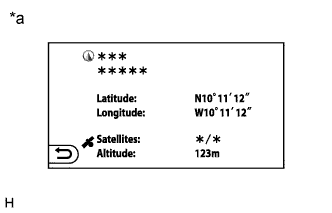 |
Display the "Location & GPS Information" screen.
Check that the actual vehicle location and current location information displayed on the screen match.
| *a | Example |
|
| ||||
| OK | |
 |
| 4.CHECK VEHICLE SIGNAL (OPERATION CHECK) |
Enter the "Vehicle Signal Check Mode" screen. Refer to Check Vehicle Signal in Operation Check (Click here).
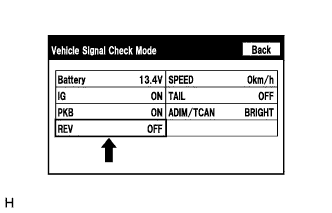 |
Check that the display changes between ON and OFF according to the shift state.
| Shift State | Display |
| Except reverse (R) | OFF |
| Reverse (R) | ON |
|
| ||||
| OK | ||
| ||
| ||
