| NG |  |
| GO TO DIAGNOSTIC TROUBLE CODE CHART (Click here) |
SMART KEY SYSTEM (for Entry Function) > All Door Entry Lock/Unlock Functions do not Operate, but Wireless Functions Operate |
| 1.CHECK FOR DTC |
Check for DTCs (Click here).
|
| ||||
| OK | |
 |
| 2.READ VALUE USING TECHSTREAM (ENTRY CANCEL) |
Connect the Techstream to the DLC3.
Turn the power switch on (IG).
Turn the Techstream on.
Enter the following menus: Body Electrical / Smart Key / Data List.
Read the Data List according to the display on the Techstream.
| Tester Display | Measurement Item/Range | Normal Condition | Diagnostic Note |
| Auto Entry Cancel SW | Entry cancel function setting / OFF or ON | Mode status displayed ON: Smart key system canceled OFF: Smart key system not canceled | The default setting for the entry cancel function is OFF. If the customer requests that the smart key system functions (locking and unlocking the doors while carrying the electrical key transmitter sub-assembly, etc.) be canceled, the setting can be changed through the customize function (Click here). |
| Result | Proceed to |
| Entry door lock function cancel is OFF | A |
| Entry door lock function cancel is ON | B |
|
| ||||
| A | |
|
| 3.CHECK WAVE ENVIRONMENT |
Move the electrical key transmitter sub-assembly as described below and perform the operation inspection (Click here).
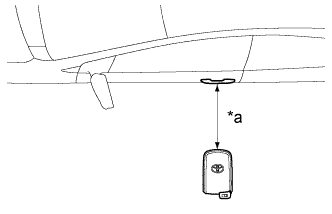 |
Bring the electrical key transmitter sub-assembly approximately 0.3 m (0.984 ft.) from the front door outside handle assembly (for driver door) and perform a driver door entry lock and unlock operation check.
| *a | Approximately 0.3 m (0.984 ft.) |
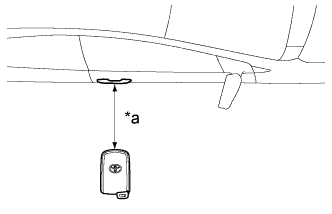 |
Bring the electrical key transmitter sub-assembly approximately 0.3 m (0.984 ft.) from the front door outside handle assembly (for front passenger door) and perform a front passenger door entry lock and unlock operation check.
| *a | Approximately 0.3 m (0.984 ft.) |
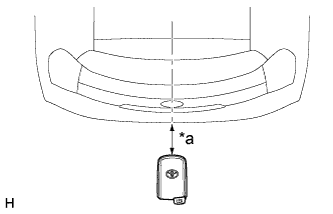 |
Bring the electrical key transmitter sub-assembly approximately 0.3 m (0.984 ft.) from the electrical key antenna (outside luggage) and perform a luggage compartment door open function check.
| *a | Approximately 0.3 m (0.984 ft.) |
| Result | Proceed to |
| All operation checks fail | A |
| All operation checks are normal | B |
| Some operation checks are normal | C |
|
| ||||
|
| ||||
| A | |
|
| 4.CHECK KEY DIAGNOSTIC MODE |
Check the following antennas in the key diagnostic mode (Click here).
Select either channel 1 or channel 2 and inspect the key diagnostic mode for each channel.
|
Check the electrical key antenna (for driver door):
| *a | 0.7 to 1 m (2.30 to 3.28 ft.) |
|
Check the electrical key antenna (for front passenger door):
| *a | 0.7 to 1 m (2.30 to 3.28 ft.) |
|
Check the electrical key antenna (outside luggage):
| *a | 0.7 to 1 m (2.30 to 3.28 ft.) |
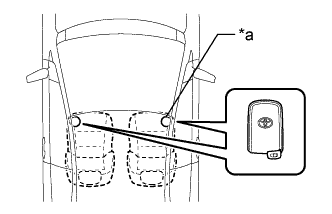 |
Check the No. 1 indoor electrical key antenna (front floor):
| *a | Inspection Point |
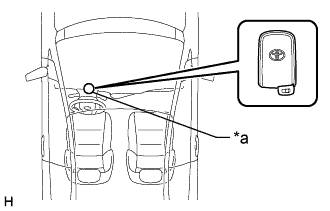 |
Check the No. 2 indoor electrical key antenna (steering column):
| *a | Inspection Point |
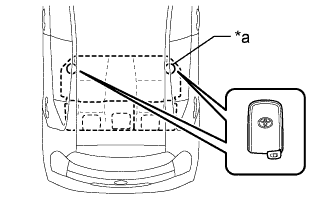 |
Check the No. 3 indoor electrical key antenna (rear floor):
| *a | Inspection Point |
| Result | Proceed to |
| All diagnostic mode inspections fail | A |
| Some diagnostic mode inspections fail (door) | B |
| Some diagnostic mode inspections fail (interior) | C |
| All diagnostic mode inspections are normal | D |
|
| ||||
|
| ||||
|
| ||||
| A | |
|
| 5.INSPECT ELECTRICAL KEY TRANSMITTER SUB-ASSEMBLY |
Check if there is another electrical key transmitter sub-assembly available that is already registered to the vehicle.
| Result | Proceed to |
| Another registered electrical key transmitter sub-assembly is not available | A |
| Another registered electrical key transmitter sub-assembly is available | B |
|
| ||||
| A | |
|
| 6.REPAIR ELECTRICAL KEY TRANSMITTER SUB-ASSEMBLY REGISTRATION (NEW ELECTRICAL KEY TRANSMITTER SUB-ASSEMBLY) |
Register a new electrical key transmitter sub-assembly (Click here).
| NEXT | |
|
| 7.CHECK ENTRY DOOR LOCK OPERATION |
Check the operation of the entry lock function (Click here).
|
| ||||
| OK | ||
 | ||
| ||
