Home › Audio / Visual / Telematics › NAVIGATION / MULTI INFO DISPLAY › NAVIGATION SYSTEM

NAVIGATION SYSTEM > CD Sound Skips

for Preparation Click here


INSPECTION PROCEDURE

NOTICE:
After replacing the radio and display receiver assembly of vehicles subscribed to pay-type satellite radio broadcasts, XM radio ID registration is necessary (w/ SDARS System).

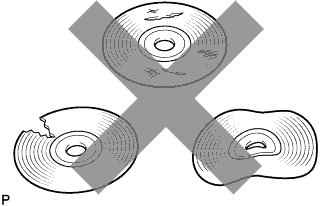
1.CHECK CD


    I100152
  1. Check that the CD is not deformed or cracked.

    OK:
    No deformation or cracks on the CD


NG
CD IS FAULTY
OK


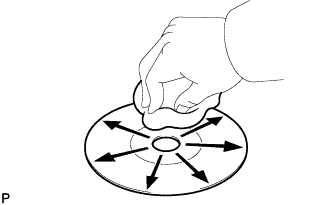
2.CHECK CD


    I100151
  1. Check the CD.

    OK:
    The CD is clean.

    NOTICE:
    Do not use a conventional record cleaner or anti-static preservative.

    HINT:
    If dirt is on the CD surface, wipe it clean with a soft cloth from the inside to the outside in a radial direction.


NG
CLEAN CD
OK


3.REPLACE CD AND RECHECK
  1. Replace the CD with a known good one and check that the malfunction disappears.

    OK:
    Malfunction disappears.


NG
Go to step 4
OK

CD WAS FAULTY 

4.CHECK RADIO AND DISPLAY RECEIVER ASSEMBLY
  1. Check the radio and display receiver assembly installation condition.

    1. Check that the radio and display receiver assembly is properly installed.

      OK:
      The radio and display receiver assembly is properly installed.


NG
REINSTALL RADIO AND DISPLAY RECEIVER ASSEMBLY PROPERLY
OK

REPLACE RADIO AND DISPLAY RECEIVER ASSEMBLY (Click here)