AUDIO AND VISUAL SYSTEM (for Radio and Display Type) > Satellite Radio Broadcast cannot be Received |
| 1.CHECK SURROUNDINGS |
Check if the vehicle is in an environment where reception is difficult due to something blocking the area above the vehicle.
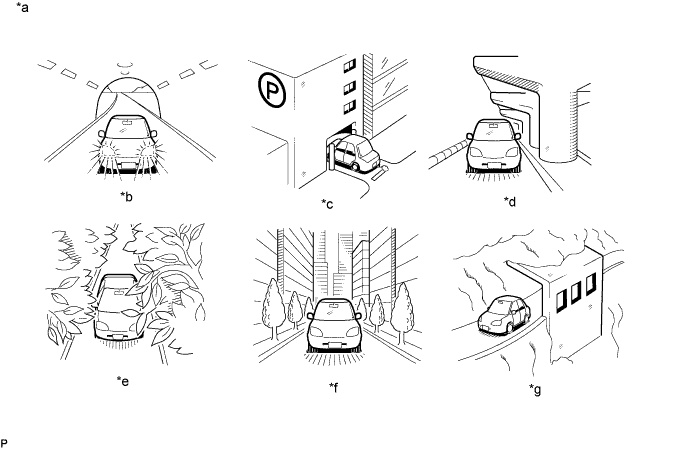
| *a | Example | *b | In a tunnel |
| *c | In a building | *d | Under an overpass |
| *e | On a forest or tree-lined path | *f | Between tall buildings |
| *g | Under a cliff or overhang | - | - |
|
| ||||
| OK | |
| 2.CHECK RADIO AND DISPLAY RECEIVER ASSEMBLY |
Check if CH001 (free broadcast) can be received.
|
| ||||
| OK | |
| 3.CHECK DISPLAY SETTING |
Check the display screen.
| Result | Proceed to |
| "Updating" is displayed | A |
| "-----" is displayed | B |
| None of the displays above are shown | C |
|
| ||||
|
| ||||
| A | |
| 4.CHECK CONTRACT CONDITIONS |
Check if the pay-type contract has been extended, or if the contract period has ended.
|
| ||||
| OK | |
| 5.PERFORM ACTIVATION REFRESH |
Perform activation refresh by referring to the satellite radio company web site (https://care.siriusxm.com/retailrefresh_view.action).
|
| ||||
| OK | ||
| ||
| 6.CHECK DISPLAY |
Check the display screen.
| Result | Proceed to |
| "Check Antenna" is displayed | A |
| "No Signal" is displayed | B |
| "Loading" is displayed | B |
| "Channel Off Air" is displayed | C |
| After "---" is displayed, display automatically switches to CH001 | D |
| None of the displays above are shown | E |
|
| ||||
|
| ||||
|
| ||||
|
| ||||
| A | |
| 7.REPLACE ANTENNA CORD SUB-ASSEMBLY |
Replace the antenna cord sub-assembly and check if radio broadcasts can be received normally (Click here).
|
| ||||
| OK | ||
| ||
| 8.INSPECT NO. 2 ANTENNA CORD SUB-ASSEMBLY |
Disconnect the No. 2 antenna cord sub-assembly.
Measure the resistance of the No. 2 antenna cord sub-assembly to check for an open circuit in the No. 2 antenna cord sub-assembly.
Measure the resistance between the No. 2 antenna cord sub-assembly and body ground to check for a short circuit in the No. 2 antenna cord sub-assembly.
|
| ||||
| OK | |
| 9.REPLACE AMPLIFIER ANTENNA ASSEMBLY |
Replace the amplifier antenna assembly and check if radio broadcasts can be received normally (Click here).
|
| ||||
| OK | ||
| ||
| 10.CONFIRM CURRENTLY SELECTED CHANNEL |
Confirm if CH000 is currently selected.
|
| ||||
| OK | ||
| ||