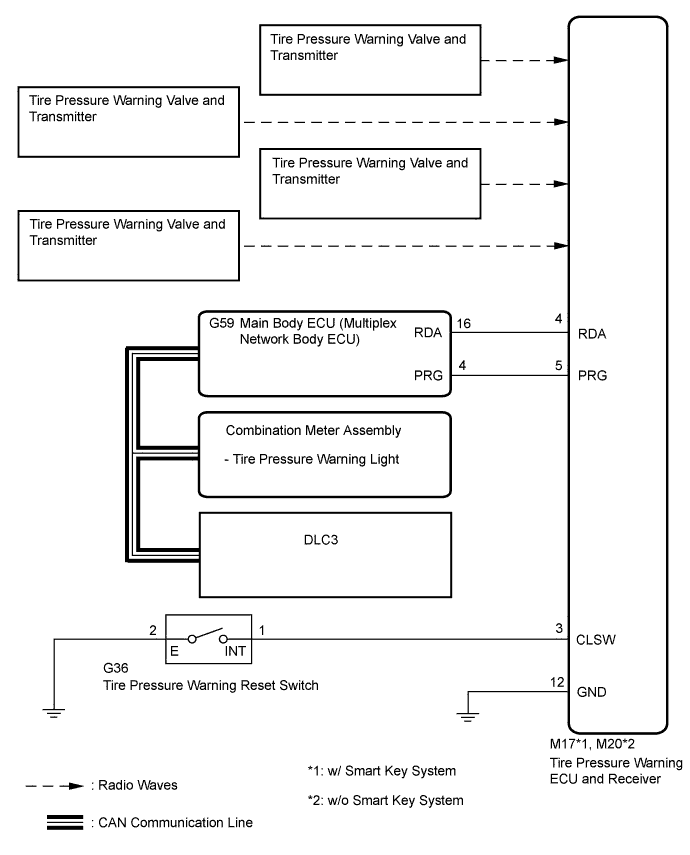
DTC C2126/26 Transmitter ID not Received in Main Mode |
| DTC No. | DTC Detection Condition | Trouble Area |
| C2126/26 | After ID registration is completed, ECU does not receive radio waves from transmitters whose IDs are stored in ECU. |
|
| 1.IDENTIFY TRANSMITTER NOT RECEIVED |
Set the tire pressure to the specified values (Click here).
Turn the ignition switch off.
Connect the Techstream to the DLC3.
Turn the ignition switch to ON.
Turn the Techstream on.
Enter the following menus: Chassis / Tire Pressure Monitor / Data List.
Check the values by referring to the table below.
| Tester Display | Measurement Item/Range | Normal Condition | Diagnostic Note |
| ID1 Tire Inflation Pressure | ID1 tire inflation pressure/ min.: Absolute pressure / 50 kPa (0.5 kgf/cm2, 7 psi), Relative pressure / 0 kPa (0 kgf/cm2, 0 psi) max.: Absolute pressure / 480 kPa (4.9 kgf/cm2, 70 psi), Relative pressure / 380 kPa (3.9 kgf/cm2, 55 psi) | Actual tire inflation pressure | If N/A is displayed, data has not been received.* |
| ID2 Tire Inflation Pressure | ID2 tire inflation pressure / min.: Absolute pressure / 50 kPa (0.5 kgf/cm2, 7 psi), Relative pressure / 0 kPa (0 kgf/cm2, 0 psi) max.: Absolute pressure / 480 kPa (4.9 kgf/cm2, 70 psi), Relative pressure / 380 kPa (3.9 kgf/cm2, 55 psi) | Actual tire inflation pressure | If N/A is displayed, data has not been received.* |
| ID3 Tire Inflation Pressure | ID3 tire inflation pressure / min.: Absolute pressure / 50 kPa (0.5 kgf/cm2, 7 psi), Relative pressure / 0 kPa (0 kgf/cm2, 0 psi) max.: Absolute pressure / 480 kPa (4.9 kgf/cm2, 70 psi), Relative pressure / 380 kPa (3.9 kgf/cm2, 55 psi) | Actual tire inflation pressure | If N/A is displayed, data has not been received.* |
| ID4 Tire Inflation Pressure | ID4 tire inflation pressure / min.: Absolute pressure / 50 kPa (0.5 kgf/cm2, 7 psi), Relative pressure / 0 kPa (0 kgf/cm2, 0 psi) max.: Absolute pressure / 480 kPa (4.9 kgf/cm2, 70 psi), Relative pressure / 380 kPa (3.9 kgf/cm2, 55 psi) | Actual tire inflation pressure | If N/A is displayed, data has not been received.* |
Rapidly reduce the tire pressure for each wheel at least 40 kPa (0.4 kgf/cm2, 5.8 psi) within 30 seconds.
Check the Data List.
After confirming that the "ID Tire Inflation Pressure" data for one tire (ID1 to ID4) has changed, repeat this procedure one by one. Identify the transmitter not received.
| Condition | Proceed to |
| One or more of transmitters abnormal | A |
| All normal | B |
|
| ||||
| A | |
 |
| 2.CHECK TRANSMITTER ID |
Turn the ignition switch off.
Connect the Techstream to the DLC3.
Turn the ignition switch to ON.
Turn the Techstream on.
Enter the following menus: Chassis / Tire Pressure Monitor / Data List.
Check the values by referring to the table below.
| Tester Display | Measurement Item/Display | Normal Condition | Diagnostic Note |
| Registered ID1 Code | Registered ID1 code/ min.: 0 max.: FFFFFFF* | ID No. registered for transmitter ID1 displayed | - |
| Registered ID2 Code | Registered ID2 code/ min.: 0 max.: FFFFFFF* | ID No. registered for transmitter ID2 displayed | - |
| Registered ID3 Code | Registered ID3 code/ min.: 0 max.: FFFFFFF* | ID No. registered for transmitter ID3 displayed | - |
| Registered ID4 Code | Registered ID4 code/ min.: 0 max.: FFFFFFF* | ID No. registered for transmitter ID4 displayed | - |
Check the ID number on the identified transmitter by removing it from the tire and wheel.
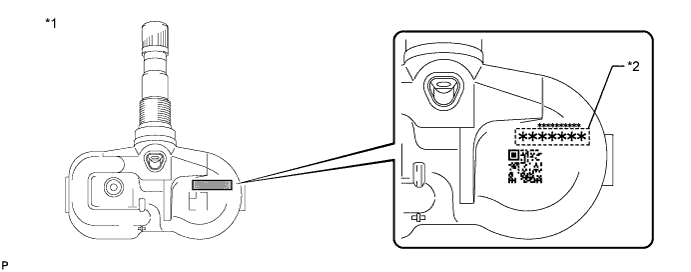
| *1 | Tire pressure warning valve and transmitter | *2 | Transmitter ID (7-digit number) |
Confirm that the ID number on the transmitter and recorded transmitter ID match.
| Result | Proceed to |
| Match | A |
| Do not match | B |
|
| ||||
| A | |
|
| 3.REPLACE TIRE PRESSURE WARNING VALVE AND TRANSMITTER |
Replace the tire pressure warning valve and transmitter (Click here).
| NEXT | |
|
| 4.REGISTRATION OF TRANSMITTER ID |
Perform registration (Click here).
| NEXT | |
|
| 5.PERFORM INITIALIZATION |
Perform initialization (Click here).
| NEXT | |
|
| 6.CONFIRM TIRE INFLATION PRESSURE (DATA LIST) |
Turn the ignition switch off.
Connect Techstream to the DLC3.
Turn the ignition switch to ON.
Turn the Techstream on.
Enter the following menus: Chassis / Tire Pressure Monitor / Data List.
Check the values by referring to the table below.
| Tester Display | Measurement Item/Range | Normal Condition | Diagnostic Note |
| ID1 Tire Inflation Pressure | ID1 tire inflation pressure/ min.: Absolute pressure / 50 kPa (0.5 kgf/cm2, 7 psi), Relative pressure / 0 kPa (0 kgf/cm2, 0 psi) max.: Absolute pressure / 480 kPa (4.9 kgf/cm2, 70 psi), Relative pressure / 380 kPa (3.9 kgf/cm2, 55 psi) | Actual tire inflation pressure | If N/A is displayed, data has not been received.* |
| ID2 Tire Inflation Pressure | ID2 tire inflation pressure / min.: Absolute pressure / 50 kPa (0.5 kgf/cm2, 7 psi), Relative pressure / 0 kPa (0 kgf/cm2, 0 psi) max.: Absolute pressure / 480 kPa (4.9 kgf/cm2, 70 psi), Relative pressure / 380 kPa (3.9 kgf/cm2, 55 psi) | Actual tire inflation pressure | If N/A is displayed, data has not been received.* |
| ID3 Tire Inflation Pressure | ID3 tire inflation pressure / min.: Absolute pressure / 50 kPa (0.5 kgf/cm2, 7 psi), Relative pressure / 0 kPa (0 kgf/cm2, 0 psi) max.: Absolute pressure / 480 kPa (4.9 kgf/cm2, 70 psi), Relative pressure / 380 kPa (3.9 kgf/cm2, 55 psi) | Actual tire inflation pressure | If N/A is displayed, data has not been received.* |
| ID4 Tire Inflation Pressure | ID4 tire inflation pressure / min.: Absolute pressure / 50 kPa (0.5 kgf/cm2, 7 psi), Relative pressure / 0 kPa (0 kgf/cm2, 0 psi) max.: Absolute pressure / 480 kPa (4.9 kgf/cm2, 70 psi), Relative pressure / 380 kPa (3.9 kgf/cm2, 55 psi) | Actual tire inflation pressure | If N/A is displayed, data has not been received.* |
| Result | Proceed to |
| Tire pressure values are not displayed. | A |
| All tire pressure readings are equal to specified values. | B |
|
| ||||
| A | ||
 | ||
| ||

