 |
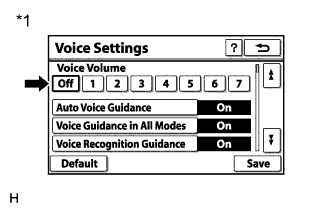
Check that "Off" is not selected.
- OK:
- "Off" is not selected.
NAVIGATION SYSTEM (for HDD) > Voice Guidance does not Function |
| 1.CHECK NAVIGATION SETTING |
Display the "Voice Settings" screen.
|
Check that "Off" is not selected.
| *1 | Example |
|
| ||||
| OK | |
 |
| 2.CHECK NAVIGATION SETTING |
Display the "Voice Settings" screen.
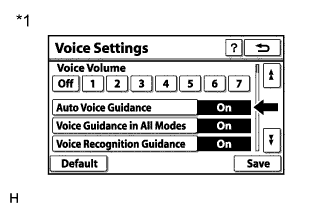 |
Check that "Auto Voice Guidance" is not "Off".
| *1 | Example |
|
| ||||
| OK | |
|
| 3.CHECK NAVIGATION SETTING |
Display the "Voice Settings" screen.
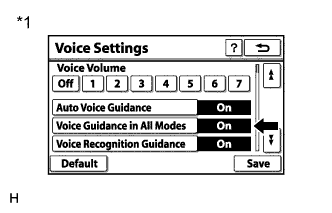 |
Check that "Voice Guidance in All Modes" is not "Off".
| *1 | Example |
|
| ||||
| OK | |
|
| 4.CHECK HARD DISK DRIVE (OPERATION CHECK) |
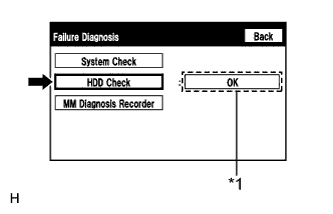 |
Enter the "Failure Diagnosis" screen. Refer to Check Hard Disk Drive in Operation Check (Click here).
Select "HDD Check" and check the result.
| *1 | Result |
|
| ||||
| OK | |
|
| 5.CHECK CABIN |
Check that condensation is not likely to occur in the cabin, and that the temperature is not high or extremely low in the cabin.
|
| ||||
| OK | |
|
| 6.CHECK AUDIO FUNCTION |
Check that audio sound can be heard from the driver side speaker.
|
| ||||
| OK | ||
 | ||
| ||
