Home › Engine / Hybrid System › 2ZR-FXE ENGINE CONTROL › SFI SYSTEM

DTC    U0293    Lost Communication with HV ECU

for Preparation Click here


MONITOR DESCRIPTION

The Controller Area Network (CAN) is a serial data communication system for real-time application. It is a multiplex communication system designed for on-vehicle use that provides a superior communication speed of 500 kbps and a capability to detect malfunctions. Through the combination of the CANH and CANL bus lines, and CANP and CANN bus lines, the CAN is able to maintain communication based on differential voltage.

DTC No.
DTC Detection Condition
Trouble Area
U0293
Communication with power management control ECU is interrupted
(1 trip detection logic)
  1. Wire harness
  2. Power management control ECU

MONITOR STRATEGY


Related DTCs
U0293: Lost communication with power management control ECU
Required Sensors/Components (Main)
ECM
Frequency of Operation
Continuous
Duration
0.576 seconds
MIL Operation
Immediately
Sequence of Operation
None

TYPICAL ENABLING CONDITIONS


Monitor runs whenever following DTCs are not present
None
Both of the following conditions are met
-
Auxiliary battery voltage
10.5 V or more
Power switch
On (IG)

TYPICAL MALFUNCTION THRESHOLDS


Communication signal
Lost communication with power management control ECU

CONFIRMATION DRIVING PATTERN

  1. Connect the Techstream to the DLC3.
  2. Turn the power switch on (IG) and turn the Techstream on.
  3. Clear the DTCs (even if no DTCs are stored, perform the clear DTC procedure).
  4. Turn the power switch off and wait for at least 30 seconds.
  5. Turn the power switch on (IG) and turn the Techstream on.
  6. Wait 5 seconds or more.
  7. Enter the following menus: Powertrain / Engine and ECT / Trouble Codes.
  8. Read the DTC.

    HINT:
    1. If a DTC is output, the system is malfunctioning.
    2. If a DTC is not output, perform the following procedure.

  9. Enter the following menus: Powertrain / Engine and ECT / Utility / All Readiness.
  10. Input the DTC: U0293.
  11. Check the DTC judgment result.

    Techstream Display
    Description
    NORMAL
    1. DTC judgment completed
    2. System normal
    ABNORMAL
    1. DTC judgment completed
    2. System abnormal
    INCOMPLETE
    1. DTC judgment not completed
    2. Perform driving pattern after confirming DTC enabling conditions
    N/A
    1. Unable to perform DTC judgment
    2. Number of DTCs which do not fulfill DTC preconditions has reached ECU's memory limit

    HINT:
    1. If the judgment result shows NORMAL, the system is normal.
    2. If the judgment result shows ABNORMAL, the system has a malfunction.

  12. If the judgment result is INCOMPLETE or N/A and no DTC is output, perform a universal trip and check for permanent DTCs (Click here).

    HINT:
    1. If a permanent DTC is output, the system is malfunctioning.
    2. If no permanent DTC is output, the system is normal.


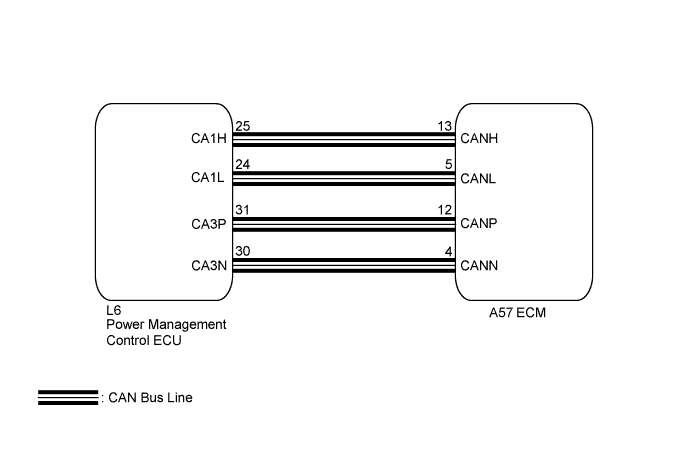
WIRING DIAGRAM


A217287E01


INSPECTION PROCEDURE

Refer to the CAN Communication System (Click here).