 |
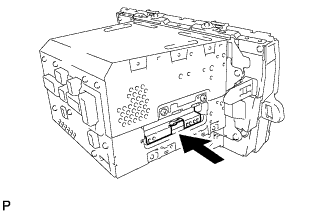
Insert the hard disk drive in the direction shown by the arrow in the illustration to install it.
HARD DISK DRIVE > INSTALLATION |
| 1. PRECAUTION |
| 2. INSTALL HARD DISK DRIVE |
|
Insert the hard disk drive in the direction shown by the arrow in the illustration to install it.
Engage the 2 guides to temporarily install the cover.
Install the cover with the 2 screws.
| 3. INSTALL NO. 2 RADIO BRACKET (w/ Daytime Running Light) |
Install the No. 2 radio bracket with the 4 screws.
| 4. INSTALL NO. 2 RADIO BRACKET (w/o Daytime Running Light) |
Install the No. 2 radio bracket with the 4 screws.
| 5. INSTALL NAVIGATION RECEIVER WITH BRACKET (w/ Daytime Running Light) |
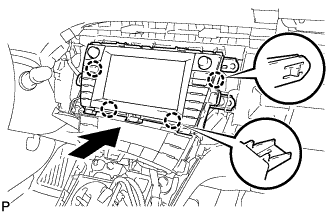 |
Engage the 4 claws and temporarily install the navigation receiver with bracket as shown in the illustration.
Install the navigation receiver with bracket with the 4 bolts.
| 6. INSTALL RADIO AND DISPLAY RECEIVER ASSEMBLY WITH BRACKET (w/o Daytime Running Light) |
Connect each connector.
Engage the 4 claws as shown in the illustration.
Install the radio and display receiver assembly with bracket with the 4 bolts.
| 7. INSTALL UPPER INSTRUMENT PANEL FINISH PANEL SUB-ASSEMBLY |
Connect the connector.
Engage the 3 claws to install the upper instrument panel finish panel sub-assembly.
| 8. INSTALL INSTRUMENT CLUSTER FINISH PANEL GARNISH |
Connect the connector.
Engage the 14 claws to install the instrument cluster finish panel garnish.
| 9. INSTALL LOWER CENTER INSTRUMENT CLUSTER FINISH PANEL SUB-ASSEMBLY |
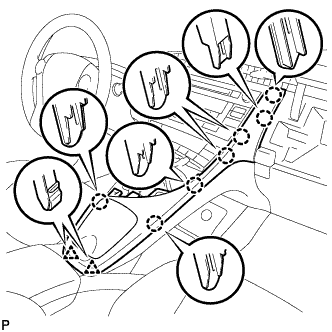 |
Engage the 7 claws and 2 clips to install the lower center instrument cluster finish panel sub-assembly.
| 10. INSTALL INTEGRATION CONTROL AND PANEL ASSEMBLY |
 |
Connect each connector.
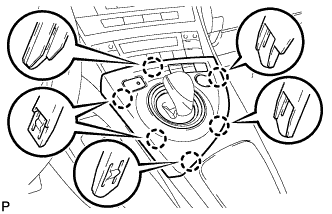
Engage the 6 claws to install the integration control and panel assembly.
| 11. CONNECT CABLE TO AUXILIARY BATTERY NEGATIVE TERMINAL |
| 12. INSTALL REAR NO. 3 FLOOR BOARD |
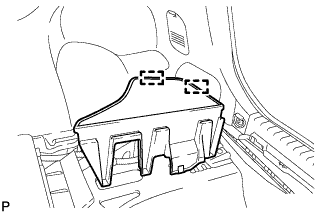 |
Engage the 2 guides to install the rear No. 3 floor board.
| 13. INSTALL REAR DECK FLOOR BOX |
Install the rear deck floor box.
| 14. INSTALL REAR NO. 2 FLOOR BOARD (for Separate Type) |
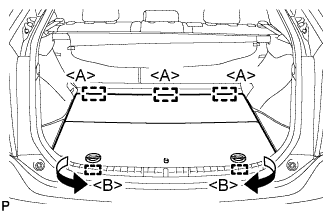 |
Engage the 3 guides <A>.
Engage the 2 guides <B> and install the rear No. 2 floor board as shown in the illustration.
| 15. INSPECT HARD DISK DRIVE |