RM3210E
_56
Audio / Visual / Telematics
_047511
NAVIGATION / MULTI INFO DISPLAY
_0243248
NAVIGATION RECEIVER
A
NAVIGATION / MULTI INFO DISPLAY NAVIGATION RECEIVER INSTALLATION
PROCEDURE

 86120L
1.INSTALL NAVIGATION RECEIVER ASSEMBLY
86212
2.INSTALL NO. 2 RADIO BRACKET
a.
Install the No. 2 radio bracket with the 3 screws.
86211
3.INSTALL NO. 1 RADIO BRACKET
a.
Install the No. 1 radio bracket with the 3 screws.
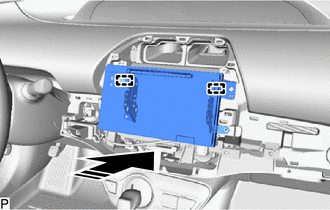
4.INSTALL NAVIGATION RECEIVER ASSEMBLY WITH BRACKET
a.
Connect each connector.
b.
0,0 0,0
false

|
Install in this Direction |
Engage the 2 guides to temporarily install the navigation receiver assembly with bracket as shown in the illustration.
c.
Install the navigation receiver assembly with bracket with the 4 bolts.
55405B
5.INSTALL CENTER INSTRUMENT CLUSTER FINISH PANEL SUB-ASSEMBLY
55435A
6.INSTALL INSTRUMENT PANEL FINISH PANEL END RH (for LHD)
7.CONNECT CABLE TO NEGATIVE AUXILIARY BATTERY TERMINAL