RM3210E
_56
Audio / Visual / Telematics
_047510
AUDIO / VIDEO
_0243399
STEREO COMPONENT AMPLIFIER
A
AUDIO / VIDEO STEREO COMPONENT AMPLIFIER INSTALLATION
PROCEDURE

 86280
1.INSTALL STEREO COMPONENT AMPLIFIER ASSEMBLY
a.
Install the stereo component amplifier assembly with the 2 bolts.
b.
Connect the 2 connectors.
c.
Engage the clamp.
86183D
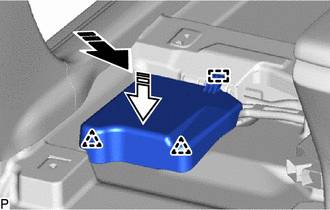
2.INSTALL AUDIO AMPLIFIER COVER
a.
0,0 0,0
false

|
Install in this Direction (1) |

|
Install in this Direction (2) |
Push the audio amplifier cover in the direction indicated by the arrow (1) shown in the illustration to engage the guide.
b.
Push the audio amplifier cover in the direction indicated by the arrow (2) shown in the illustration to engage the 2 clips and install the audio amplifier cover.
3.INSTALL FRONT SEAT ASSEMBLY LH