THEFT DETERRENT / KEYLESS ENTRY ENTRY AND START SYSTEM(for Entry Function) Touching Unlock Sensor for Certain Period of Time does not Unlock All Doors
DESCRIPTION
If the entry unlock function of the driver door cannot be operated by touching and holding the unlock sensor of the driver door, but can be operated through other methods, it can be determined that the request code is being transmitted properly from the driver door. In this case, the certification ECU (smart key ECU assembly) may be malfunctioning.
PROCEDURE
Connect the GTS to the DLC3.
Turn the power switch on (IG).
Turn the GTS on.
Enter the following menus: Customize Setting / Wireless Door Lock.
- Entry & Start
-
Tester Display Description Default Setting ECU Door Unlock Sensor Touch Time Adjust Function that sets the length of time the unlock sensor on the door outside handle assembly (for driver door) must be touched to unlock all of the doors Middle 00:OFF,01:Short,10:Middle,11:Long Certification ECU (smart key ECU assembly) - 50006 17
- Result:
Result Proceed to The customize setting is set to Short, Middle or Long. A The customize setting is set to OFF. B
A
B
Turn the power switch off.
Open and close the driver door.
With the electrical key transmitter sub-assembly outside of the vehicle, press the lock switch of the electrical key transmitter sub-assembly to lock all of the doors.
Hold the electrical key transmitter sub-assembly at the same height as the door outside handle assembly and approximately 0.3 m (0.984 ft.) from the driver door.
Check that the LED of the electrical key transmitter sub-assembly blinks.
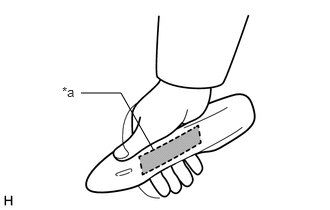
| *a | Unlock Sensor (Backside) |
Touch and hold the unlock sensor on the door outside handle assembly (for driver door) for 2.5 seconds or more.
- HINT:
-
When checking the operation of the unlock sensor again, make sure to perform the procedure from step (a).
Check that all of the doors unlock.
- Result:
Result Proceed to All of the doors do not unlock. A Any door does not unlock. B
A
B
When the door control switch on the multiplex network master switch assembly is operated, check that the doors unlock and lock according to the switch operation.
Click hereVehicle Interior>DOOR LOCK>POWER DOOR LOCK CONTROL SYSTEM>OPERATION CHECK
- Result:
Result Proceed to The door locks operate normally. A The door locks do not operate normally. B
A
B
Click hereVehicle Interior>DOOR LOCK>POWER DOOR LOCK CONTROL SYSTEM>HOW TO PROCEED WITH TROUBLESHOOTING