 |
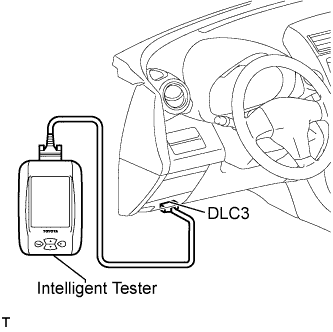
Connect the intelligent tester to the DLC3.
Turn the ignition switch on (IG).
Read the DTCs following the prompts on the tester screen.
- HINT:
- Refer to the intelligent tester operator's manual for further details.
TIRE PRESSURE WARNING SYSTEM > DTC CHECK / CLEAR |
| DTC CHECK (USING INTELLIGENT TESTER) |
|
Connect the intelligent tester to the DLC3.
Turn the ignition switch on (IG).
Read the DTCs following the prompts on the tester screen.
| CHECK DTC (USING SST CHECK WIRE) |
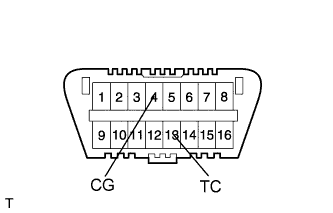 |
Using SST, connect terminals 13 (TC) and 4 (CG) of the DLC3.
 |
Turn the ignition switch on (IG).
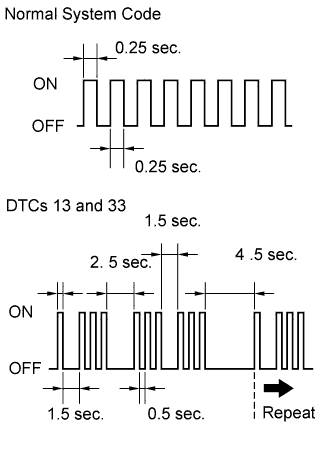 |
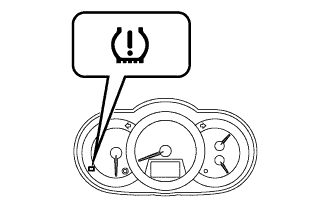
Read and record any DTCs from the tire pressure warning light on the combination meter. Refer to the illustration for examples of a normal system code and DTCs 13 and 33.
| Trouble Area | See procedure |
| Tire pressure warning light circuit |
Click here
|
| TC and CG terminal circuit |
Click here
|
Refer to the Diagnostic Trouble Code Chart for DTC information (Click here).
After completing the check, turn the ignition switch off and remove SST from the DLC3.
| CLEAR THE DTC (USING INTELLIGENT TESTER) |
|
Connect the intelligent tester to the DLC3.
Turn the ignition switch on (IG).
Erase the DTCs following the prompts on the tester screen.