| NG |  |
| Go to step 4 |
DTC B2342 Switch Failure |
| DTC Code | DTC Detection Condition | Trouble Area |
| B2342 | Sliding roof drive gear (sliding roof ECU) detects SLIDE OPEN or TILT UP switch in map light assembly is stuck for 30 seconds or more |
|
| 1.READ VALUE USING INTELLIGENT TESTER (SLIDE OPEN AND TILT UP SWITCH) |
Use the Data List to check if the sliding roof control switch is functioning properly.
| Item | Measurement Item / Range (Display) | Normal Condition | Diagnostic Note |
| Open Switch Failure (Current) | SLIDE OPEN switch condition (current) / Fail or Not Fail | Fail: SLIDE OPEN switch is stuck Not Fail: SLIDE OPEN switch is not stuck | - |
| Close Switch Failure (Current) | TILT UP switch condition (current) / Fail or Not Fail | Fail: TILT UP switch is stuck Not Fail: SLIDE OPEN switch is not stuck | - |
| Open Switch Failure (Past) | SLIDE OPEN switch condition (past) / Fail or Not Fail | Fail: SLIDE OPEN switch was stuck in past Not Fail: SLIDE OPEN switch was not stuck in past | - |
| Close Switch Failure (Past) | TILT UP switch condition (past) / Fail or Not Fail | Fail: TILT UP switch was stuck in past Not Fail: TILT UP switch was not stuck in past | - |
|
| ||||
| OK | |
 |
| 2.CHECK SLIDING ROOF FUNCTION |
Check the auto operation with the SLIDE OPEN and TILT UP switch (Click here).
|
| ||||
| OK | |
|
| 3.DELETE DTC |
Delete the DTC (Click here).
| NEXT | ||
 | ||
| ||
| 4.INSPECT MAP LIGHT ASSEMBLY (SLIDING ROOF CONTROL SWITCH) |
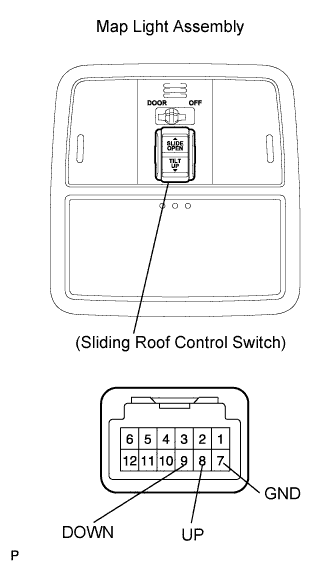 |
Remove the map light assembly.
Measure the resistance of the switch.
| Tester Connection | Switch Condition | Specified Condition |
| 8 (UP) - 7 (GND) | TILT UP switch pushed | Below 1 Ω |
| 8 (UP) - 7 (GND) | TILT UP switch not pushed | 10 kΩ or higher |
| 9 (DOWN) - 7 (GND) | SLIDE OPEN switch pushed | Below 1 Ω |
| 9 (DOWN) - 7 (GND) | SLIDE OPEN switch not pushed | 10 kΩ or higher |
| Result | Proceed to |
| NG | A |
| OK | B |
|
| ||||
| A | |
|
| 5.REPLACE MAP LIGHT ASSEMBLY (SLIDING ROOF CONTROL SWITCH) |
Temporarily replace the map light assembly (sliding roof control switch) with a new or normally functioning one (Click here).
| NEXT | |
|
| 6.DELETE DTC |
Delete the DTC (Click here).
| NEXT | ||
| ||
| ||
| 7.INITIALIZE SLIDING ROOF DRIVE GEAR SUB-ASSEMBLY (SLIDING ROOF ECU) |
Check that the sliding roof drive gear can be initialized (Click here).
|
| ||||
| OK | |
|
| 8.CHECK SLIDING ROOF FUNCTION |
Check the auto operation with the SLIDE OPEN and TILT OPEN switch (Click here).
|
| ||||
| OK | |
|
| 9.DELETE DTC |
Delete the DTC (Click here).
| NEXT | ||
| ||
| ||
| 10.CHECK WIRE HARNESS (SLIDING ROOF DRIVE GEAR - MAP LIGHT ASSEMBLY) |
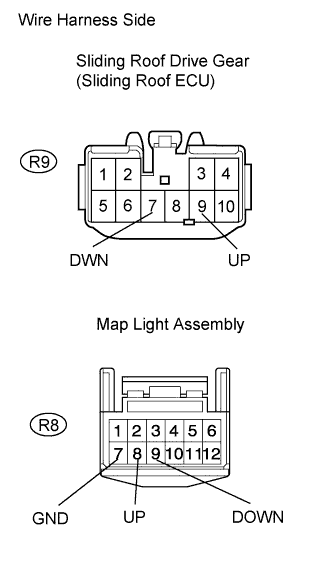 |
Disconnect the R9 ECU connector.
Disconnect the R8 map light connector.
Measure the resistance of the wire harness side connector.
| Tester Connection | Specified Condition |
| R9-7 (DWN) - R8-9 (DOWN) | Below 1 Ω |
| R9-9 (UP) - R8-8 (UP) | Below 1 Ω |
| R8-7 (GND) - Body ground | Below 1 Ω |
| R8-9 (DOWN) - Body ground | 10 kΩ or higher |
| R8-8 (UP) - Body ground | 10 kΩ or higher |
|
| ||||
| OK | ||
| ||
| ||
