 |
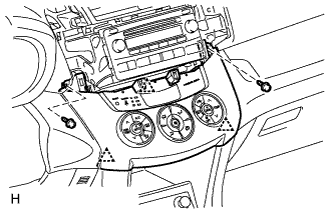
Connect the connectors.
AIR CONDITIONING PANEL (for Automatic Air Conditioning System) > INSTALLATION |
| 1. INSTALL AIR CONDITIONING CONTROL ASSEMBLY |
|
Connect the connectors.
Attach the 3 clips to install the air conditioning control.
Install the 2 screws.
| 2. INSTALL NAVIGATION RECEIVER ASSEMBLY WITH BRACKET (w/ Navigation System) |
for DVD:
Install the navigation receiver assembly with bracket .
for HDD:
Install the navigation receiver assembly with bracket .
| 3. INSTALL STEREO OPENING COVER (w/o Radio Receiver) |
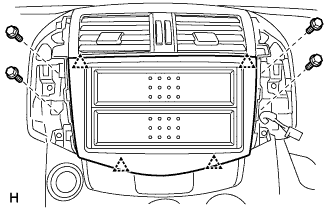 |
Attach the 4 clips to install the stereo opening cover.
Install the 4 bolts.
| 4. INSTALL RADIO RECEIVER (w/ Radio Receiver) |
for 3ZR-FAE
Install the radio receiver assembly with bracket .
for 3ZR-FAE
Install the radio receiver assembly with bracket .
| 5. INSTALL NO. 1 INSTRUMENT CLUSTER FINISH PANEL CENTER |
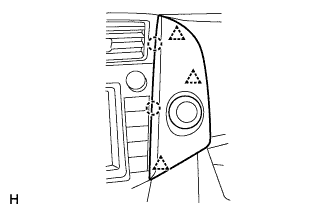 |
Connect the connector.
Attach the 3 clips and 2 claws to install the cluster finish panel.
| 6. INSTALL NO. 2 INSTRUMENT CLUSTER FINISH PANEL CENTER |
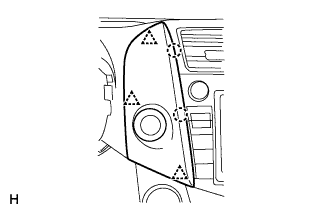 |
Connect the connector.
Attach the 3 clips and 2 claws to install the cluster finish panel.
| 7. CONNECT CABLE TO NEGATIVE BATTERY TERMINAL |
| 8. CHECK SRS WARNING LIGHT |
Check the SRS warning light (Click here).