RM30B0U
_56
Audio / Visual / Telematics
_009403
AUDIO / VIDEO
_0051157
RADIO ANTENNA HOLDER
A
AUDIO / VIDEO RADIO ANTENNA HOLDER INSTALLATION
PROCEDURE

 1.INSTALL AMPLIFIER ANTENNA ASSEMBLY
a.
Attach the 2 claws to install the with holder antenna assembly.
b.
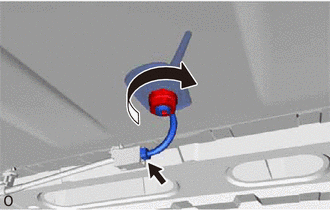
Install the nut.
- Torque:
- 4.5 N*m (46 kgf*cm, 40 in.*lbf)
c.
Connect the connector.
2.INSTALL SATELLITE RADIO ANTENNA ASSEMBLY
a.
Attach the 2 claws to install the with holder antenna assembly.
b.
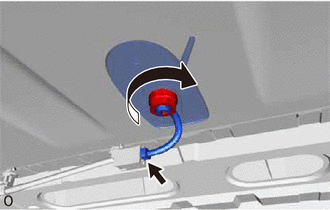
Install the nut.
- Torque:
- 4.5 N*m (46 kgf*cm, 40 in.*lbf)
c.
Connect the connector.
3.INSTALL ROOF ANTENNA POLE SUB-ASSEMBLY
4.INSTALL ROOF HEADLINING ASSEMBLY
5.CONNECT CABLE TO NEGATIVE BATTERY TERMINAL
- NOTICE:
-
When disconnecting the cable, some systems need to be initialized after the cable is reconnected.
-
Click hereGeneral>INTRODUCTION>REPAIR INSTRUCTION>INITIALIZATION