RM30B0U
_56
Audio / Visual / Telematics
_009403
AUDIO / VIDEO
_0054849
AUDIO AND VISUAL SYSTEM(for Radio and Display Type)
J
AUDIO / VIDEO AUDIO AND VISUAL SYSTEM(for Radio and Display Type) Voice Guidance does not Function
CAUTION / NOTICE / HINT
- NOTICE:
-
After replacing the radio and display receiver assembly of vehicles subscribed to pay-type satellite radio broadcasts, XM radio ID registration is necessary (w/ SDARS System).
PROCEDURE
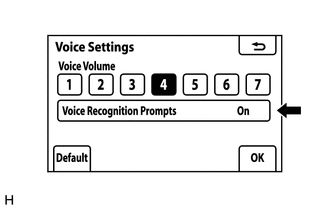
1.CHECK VOICE GUIDANCE SETTING
a.
0.131,0.075 0.301,0.23
0.17,0.155
10
*a
| *a | Example |
Display the "Voice Settings" screen.
b.
Check that "Off" is not selected.
- Result:
Proceed to "Off" is not selected "Off" is selected
"Off" is not selected
2.CHECK AUDIO FUNCTION
"Off" is selected
TURN VOICE RECOGNITION PROMPTS "On"
2.CHECK AUDIO FUNCTION
a.
Check that sound can be heard from a front speaker.
- Result:
Proceed to Sound can be heard Sound cannot be heard
Sound can be heard
REPLACE RADIO AND DISPLAY RECEIVER ASSEMBLY
Sound cannot be heard
PROCEED TO NEXT SUSPECTED AREA SHOWN IN PROBLEM SYMPTOMS TABLE