NAVIGATION / MULTI INFO DISPLAY HARD DISK DRIVE REMOVAL
PROCEDURE

 1. PRECAUTION
- NOTICE:
- ·
After turning the engine switch off, waiting time maybe required before disconnecting the cable from the battery terminal. Therefore, make sure to read the disconnecting the cable from the battery terminal notice before proceeding with work.
Click hereGeneral>INTRODUCTION>REPAIR INSTRUCTION>PRECAUTION
·Precautions for the multi-media module receiver assembly and hard disc.
Click hereAudio / Visual / Telematics>NAVIGATION / MULTI INFO DISPLAY>NAVIGATION SYSTEM(for HDD)>PRECAUTION
2.DISCONNECT CABLE FROM NEGATIVE BATTERY TERMINAL
- NOTICE:
-
When disconnecting the cable, some systems need to be initialized after the cable is reconnected.
-
Click hereGeneral>INTRODUCTION>REPAIR INSTRUCTION>INITIALIZATION
55412C
3.REMOVE CENTER NO. 1 INSTRUMENT CLUSTER FINISH PANEL
55670
4.REMOVE NO. 3 INSTRUMENT PANEL REGISTER ASSEMBLY
55680A
5.REMOVE NO. 4 INSTRUMENT PANEL REGISTER ASSEMBLY
83950M
6.REMOVE TELLTALE LIGHT ASSEMBLY
86804A
7.REMOVE NAVIGATION ECU SUB-ASSEMBLY
86211
8.REMOVE NO. 1 RADIO BRACKET
86271L
9.REMOVE HARD DISC
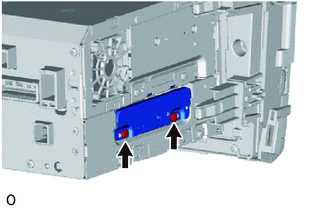
Remove the 2 screws.
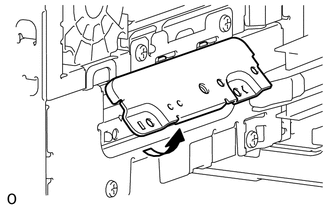
Move the cover in the direction of the arrow shown in the illustration to remove it.
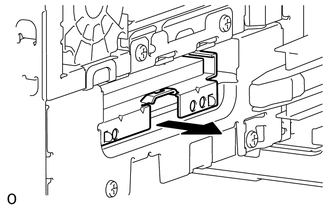
Remove the hard disc in the direction of the arrow shown in the illustration.