2AD-FHV ENGINE CONTROL ECD SYSTEM P1229 Fuel Pump System
DESCRIPTION
| DTC No. | Detection Item | DTC Detection Condition | Trouble Area | MIL | Memory |
|---|---|---|---|---|---|
| P1229 | Fuel Pump System | The actual fuel pressure exceeds the target fuel pressure by 5000 kPa or higher for 30 seconds.
(1 trip detection logic) |
·
Short in suction control valve circuit ·
Suction control valve ·
Fuel pressure sensor (common rail assembly) ·
ECM |
Comes on | DTC stored |
| DTC No. | Data List |
|---|---|
| P1229 | ·
Fuel Press ·
Target Common Rail Pressure ·
Injection Pressure Correction ·
Target Pump SCV Current ·
Pump SCV Learning Value |
- HINT:
- ·
For more information on the fuel supply pump assembly (suction control valve) and common rail system, refer to System Description (Click here Engine / Hybrid System>2AD-FHV ENGINE CONTROL>ECD SYSTEM>SYSTEM DESCRIPTION).
·When DTC P1229 is stored, check the internal fuel pressure of the common rail by entering the following menus: Powertrain / Engine / Data List / Fuel Press, Target Common Rail Pressure.
Under a stable condition such as idling after warm up the engine, Fuel Press is within +/- 5000 kPa of Target Common Rail Pressure when normal.
·When there is a problem with the movement of the fuel supply pump assembly (when Fuel Press is higher than Target Common Rail Pressure due to a problem in which the suction valve has difficulty closing), the values of Injection Pressure Correction and Target Pump SCV Current decrease.
MONITOR DESCRIPTION
- P1229 (Fuel over-feed):
-
The ECM stores this DTC if the actual fuel pressure inside the common rail remains higher than the target fuel pressure, despite the ECM closing the suction control valve. This DTC indicates that the suction control valve may be stuck open, or there may be a short in its circuit.
-
If this DTC is stored, the ECM enters fail-safe mode and limits the engine power. The fail-safe mode continues until the ignition switch is turned off.
CONFIRMATION DRIVING PATTERN
| DTC No. | DTC Detection Drive Pattern |
|---|---|
| P1229 | Idling for 60 seconds |
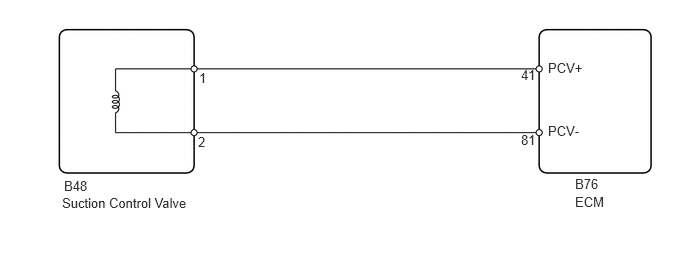
WIRING DIAGRAM
CAUTION / NOTICE / HINT
- NOTICE:
- ·
After replacing the ECM, the new ECM needs registration (Click here Engine / Hybrid System>2AD-FHV ENGINE CONTROL>ECD SYSTEM>REGISTRATION) and initialization (Click here Engine / Hybrid System>2AD-FHV ENGINE CONTROL>ECD SYSTEM>INITIALIZATION).
·After replacing the fuel supply pump, the ECM needs initialization (Click here Engine / Hybrid System>2AD-FHV ENGINE CONTROL>ECD SYSTEM>INITIALIZATION).
- HINT:
- ·
Read freeze frame data using the GTS. Freeze frame data records the engine condition when malfunctions are detected. When troubleshooting, freeze frame data can help determine if the vehicle was moving or stationary, if the engine was warmed up or not, and other data from the time the malfunction occurred.
·When this DTC is stored, be sure to carefully examine "Fuel Press", "Target Common Rail Pressure", "Target Pump SCV Current", and "Pump SCV Learning Value" in the freeze frame data.
PROCEDURE
Connect the GTS to the DLC3.
Turn the ignition switch to ON and turn the GTS on.
Enter the following menus: Powertrain / Engine / Trouble Codes.
- Powertrain > Engine > Trouble Codes
- 50001 61
Read the DTCs.
- Result:
Result Proceed to Except above A DTC P1229 and "P0190, P0192 and/or P0193" are output B
A
B
Connect the GTS to the DLC3.
Turn the ignition switch to ON and turn the GTS on.
Start the engine and warm it up.
Enter the following menus: Powertrain / Engine / Data List / Fuel Press and Target Common Rail Pressure.
- Powertrain > Engine > Data List
-
Tester Display Target Common Rail Pressure Fuel Press - 50003 61 706,54
Check that the internal fuel pressure of the common rail is within the specification below.
- OK:
Fuel Press is within 5000 kPa of Target Common Rail Pressure when engine is idling after warm up the engine.
- Result:
Proceed to OK NG
OK
NG
Disconnect the suction control valve connector.
Disconnect the ECM connector.
Measure the resistance according to the value(s) in the table below.
- Standard Resistance:
Tester Connection Condition Specified Condition B48-1 - B76-41 (PCV+) Always Below 1 Ω B48-2 - B76-81 (PCV-) Always Below 1 Ω B48-1 or B76-41 (PCV+) - Body ground Always 10 kΩ or higher B48-2 or B76-81 (PCV-) - Body ground Always 10 kΩ or higher
- Result:
Proceed to OK NG
OK
NG
Repair or replace the harness or connector.
- Result:
Proceed to NEXT
NEXT
Connect the GTS to the DLC3.
Turn the ignition switch to ON and turn the GTS on.
Enter the following menus: Powertrain / Engine / Active Test / Test the Fuel Leak / Data List / Fuel Press, Target Common Rail Pressure.
- Powertrain > Engine > Active Test
-
Active Test Display Test the Fuel Leak -
Data List Display Target Common Rail Pressure Fuel Press - 50004 61 90 706,54
Take a snapshot with the GTS during the Active Test.
Measure the difference between the target fuel pressure (Target Common Rail Pressure) and the actual fuel pressure (Fuel Press) when the "Test the Fuel Leak" Active Test is performed.
Click hereEngine / Hybrid System>2AD-FHV ENGINE CONTROL>ECD SYSTEM>DATA LIST / ACTIVE TEST
- HINT:
-
In order to obtain an exact measurement, perform the Active Test 5 times and measure the difference once each time the Active Test is performed.
- OK:
The difference between the target fuel pressure and the actual fuel pressure 2 seconds after the Active Test starts is less than 10000 kPa.
- Result:
Result Proceed to Except above A The difference between the target fuel pressure and the actual fuel pressure 2 seconds after the Active Test starts is less than 10000 kPa. B
A
B
Replace the fuel filter element assembly.
Click hereEngine / Hybrid System>2AD-FHV FUEL>FUEL FILTER>REPLACEMENT
- Result:
Proceed to NEXT
NEXT
Replace the Replace the suction control valve.
Click hereEngine / Hybrid System>2AD-FHV FUEL>SUCTION CONTROL VALVE>REMOVAL
- Result:
Proceed to NEXT
NEXT
Bleed the air from the fuel system.
Click hereEngine / Hybrid System>2AD-FHV FUEL>FUEL SYSTEM>ON-VEHICLE INSPECTION
- Result:
Proceed to NEXT
NEXT
Perform supply pump initialization.
Click hereEngine / Hybrid System>2AD-FHV ENGINE CONTROL>ECD SYSTEM>INITIALIZATION
- Result:
Proceed to NEXT
NEXT
Connect the GTS to the DLC3.
Turn the ignition switch to ON.
Turn the GTS on.
Clear the DTCs.
- Powertrain > Engine > Clear DTCs
- 50002 61
Turn the ignition switch off for 30 seconds or more.
Start the engine.
Idle the engine for 60 seconds, and then run it at 2500 rpm without load for 60 seconds.
Enter the following menus: Powertrain / Engine / Trouble Codes.
- Powertrain > Engine > Trouble Codes
- 50001 61
Confirm that the DTC is not output again.
- HINT:
-
Perform the following procedure using the GTS to determine whether or not the DTC judgment has been carried out.
Enter the following menus: Powertrain / Engine / Utility / All Readiness.
- Powertrain > Engine > Utility
-
Tester Display All Readiness - 50005 61 20
Input DTC P1229.
Check that STATUS is NORMAL. If STATUS is INCOMPLETE or N/A, increase the idling time.
- Result:
Proceed to NEXT
NEXT