NAVIGATION / MULTI INFO DISPLAY NAVIGATION ECU INSTALLATION
PROCEDURE

 86841
1.INSTALL NAVIGATION ECU
Connect the connector.
Attach the clamp to install the antenna cord.
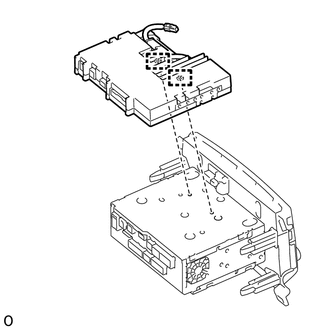
Attach the 2 guides to install the navigation ECU as shown in the illustration.
86211
2.INSTALL NO. 1 RADIO BRACKET
except 7 inch Type
Install the No. 2 radio bracket with the 5 screws.
for 7 inch Type
Install the No. 2 radio bracket with the 5 screws.
86212
3.INSTALL NO. 2 RADIO BRACKET
except 7 inch Type
Install the No. 2 radio bracket with the 5 screws.
for 7 inch Type
Install the No. 2 radio bracket with the 5 screws.
4.INSTALL WIRE HARNESS
Connect each connector to install the wire harness.
86140A
5.INSTALL RADIO AND DISPLAY RECEIVER ASSEMBLY (for Radio and Display Type)
6.CONNECT CABLE TO NEGATIVE BATTERY TERMINAL
- NOTICE:
-
When disconnecting the cable, some systems need to be initialized after the cable is reconnected.
-
Click hereGeneral>INTRODUCTION>REPAIR INSTRUCTION>INITIALIZATION