A25A-FXS ENGINE CONTROL ECM INSTALLATION
PROCEDURE

 89668
1.INSTALL NO. 2 ECM BRACKET
Install the No. 2 ECM bracket to the ECM with the 2 screws.
- Torque:
- 4.5 N*m (46 kgf*cm, 40 in.*lbf)
- NOTICE:
-
If the ECM has been struck or dropped, replace it.
89667E
2.INSTALL NO. 1 ECM BRACKET
Install the No. 1 ECM bracket to the ECM with the 2 screws.
- Torque:
- 4.5 N*m (46 kgf*cm, 40 in.*lbf)
- NOTICE:
-
If the ECM has been struck or dropped, replace it.
89661
3.INSTALL ECM
Install the ECM with the 2 nuts and bolt.
- Torque:
- 8.0 N*m (82 kgf*cm, 71 in.*lbf)
- NOTICE:
-
If the ECM has been struck or dropped, replace it.
Install the bolt and attach the clamp.
- Torque:
- 10 N*m (102 kgf*cm, 7 ft.*lbf)
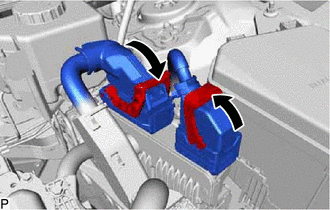
Connect the 2 connectors to the ECM and push down the lever to lock it.
- NOTICE:
- ·
When connecting the ECM connectors, make sure that the connecting parts of the ECM connectors are free of dirt, water and other foreign matter.
·Be sure to securely connect the ECM connectors.
4.CONNECT CABLE TO NEGATIVE AUXILIARY BATTERY TERMINAL
65351A
5.INSTALL BATTERY HOLE COVER
58416K
6.INSTALL REAR NO. 2 FLOOR BOARD
58410B
7.INSTALL DECK BOARD ASSEMBLY
8.PERFORM INITIALIZATION
w/ Canister Pump Module:
Click hereEngine / Hybrid System>A25A-FXS (ENGINE CONTROL)>SFI SYSTEM (w/ Canister Pump Module)>PRECAUTION
w/o Canister Pump Module:
Click hereEngine / Hybrid System>A25A-FXS (ENGINE CONTROL)>SFI SYSTEM (w/o Canister Pump Module)>PRECAUTION