RM3620E
_56
Audio / Visual / Telematics
_076049
TELEMATICS
_0370498
MAYDAY BATTERY
A
TELEMATICS MAYDAY BATTERY REMOVAL
CAUTION / NOTICE / HINT
The necessary procedures (adjustment, calibration, initialization or registration) that must be performed after parts are removed, installed or replaced during the mobilephone battery removal/installation are shown below.
| Replacement Part or Procedure | Necessary Procedures | Effect/Inoperative Function When Necessary Procedures not Performed | Link |
|---|---|---|---|
| Mobilephone battery | Reset mobilephone battery condition | Emergency call service | ( ) |
PROCEDURE

 1. PRECAUTION
86740
2.REMOVE TELEPHONE TRANSCEIVER ASSEMBLY
86725
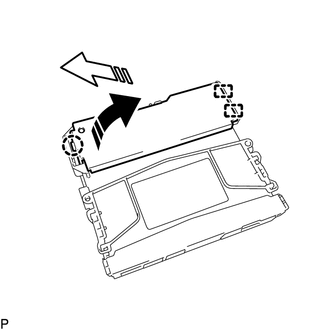
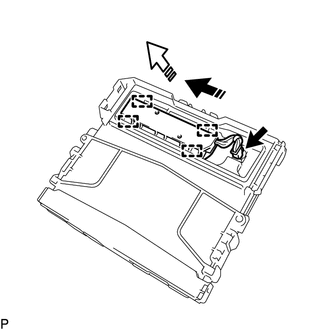
3.REMOVE MOBILEPHONE BATTERY
a.
0,0 0,0
false

|
Remove in this Direction (1) |

|
Remove in this Direction (2) |
Detach the claw and guide and remove the transceiver cover as shown in the illustration.
b.
0,0 0,0
false
|
|
Remove in this Direction (1) |
|
|
Remove in this Direction (2) |
Disconnect the connector.
c.
Detach the guide and remove the mobilephone battery as shown in the illustration.