TIRE PRESSURE MONITORING TIRE PRESSURE WARNING SYSTEM REGISTRATION
PROCEDURE

 1. BEFORE REGISTRATION
- NOTICE:
- ·
The transmitter ID is written on the tire pressure warning valve and transmitter. It is not possible to read the transmitter ID after installing the tire onto the wheel. Therefore, make a note of the transmitter ID before installing the tire.
·Make sure to perform ID registration using the GTS after replacing the tire pressure warning ECU and receiver.
When replacing the tire pressure warning ECU and receiver:
When replacing the tire pressure warning ECU and receiver, read the transmitter IDs and number of the transmitters (4 or 5) stored in the old ECU using the GTS and write them down before removal.
If reading the stored transmitter IDs is impossible due to malfunctions of components such as the tire pressure warning ECU and receiver, remove the tires from the wheels and check the IDs located on the tire pressure warning valve and transmitters.
When replacing a tire pressure warning valve and transmitter:
Take a note of the 7-digit number (transmitter ID) written on the tire pressure warning valve and transmitter.
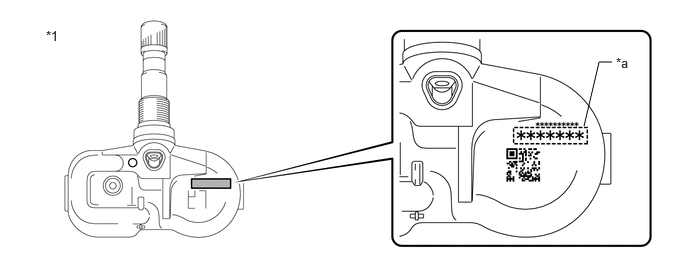
| *1 | Tire Pressure Warning Valve and Transmitter | - | - |
| *a | Transmitter ID (7-digit Number) | - | - |
2.REGISTER TRANSMITTER ID
- NOTICE:
- ·
Before performing ID registration for the 2nd tire set, make sure that ID registration has been completed for the main tire set.
·If ID registration for the main tire set has not been completed, it is not possible to perform ID registration for the 2nd tire set.
·When performing ID registration for the 2nd tire set, make sure that both the main tire set and 2nd tire set are close to the vehicle (within 10 m (32.8 ft.)).
- HINT:
-
If the main tire set is not close to the vehicle (within 10 m (32.8 ft.)) when ID registration is performed for the 2nd tire set, DTC C2126 will be stored.
·Make sure to install the appropriate tire set before performing ID switching.
- HINT:
- ·
The previously registered IDs will be cleared from memory when registration is completed.
·If the ID registration step is not completed within 300 seconds, ID registration will be canceled.
·When performing ID registration for the 2nd tire set, select "2nd Set" on the GTS.
Set the tire pressure to the specified value.
Click hereSuspension>TIRE / WHEEL>TIRE AND WHEEL SYSTEM>INSPECTION
Turn the ignition switch off.
Connect the GTS to the DLC3.
Turn the ignition switch to ON.
Turn the GTS on.
Enter the following menus: Chassis / Tire Pressure Monitor / Utility / ID Registration.
- Chassis > Tire Pressure Monitor > Utility
-
Tester Display ID Registration - 50005 203 149
Perform the procedure displayed on the GTS.
3. CONFIRMATION OF TRANSMITTER ID REGISTRATION
- NOTICE:
- ·
It may take a few minutes until the values are displayed. If the values are not displayed after a few minutes, perform troubleshooting according to the inspection procedure for DTCs C2121 to C2124 (C2125: w/ Full Size Spare Tire).
Click hereSuspension>TIRE PRESSURE MONITORING>TIRE PRESSURE WARNING SYSTEM>C2121
·If the transmitter IDs have not been registered, DTC C2171 is stored in the tire pressure warning ECU and receiver after 3 minutes or more.
·If normal pressure values are displayed, the transmitter IDs have been registered correctly.
·If the tire pressure values are not displayed after a few minutes, the transmitter IDs may be incorrect or the system may have a malfunction.
·After all transmitter IDs are registered, DTC C2126 is stored in the tire pressure warning ECU and receiver and the tire pressure warning light blinks for 1 minute and then illuminates. When the tire pressure warning ECU and receiver successfully receives signals from all the transmitters whose IDs are stored in the ECU, DTC C2126 is cleared and the tire pressure warning light goes off.
When checking the ID registration for the 2nd tire set:
Operate the steering pad switch assembly and switch the IDs to the 2nd set of tires.
Enter the following menus: Chassis / Tire Pressure Monitor / Data List.
- Chassis > Tire Pressure Monitor > Data List
-
Tester Display Measurement Item Range Normal Condition Diagnostic Note ID 1 Tire Inflation Pressure ID1 tire inflation pressure min.: Absolute pressure (abs) / 0 kPa (0 kgf/cm2, 0 psi), Relative pressure (Gauge) / 0 kPa (0 kgf/cm2, 0 psi)
max.: Absolute pressure (abs) / 480 kPa (4.9 kgf/cm2, 70 psi), Relative pressure (Gauge) / 380 kPa (3.9 kgf/cm2, 55 psi)Actual tire inflation pressure If N/A is displayed, data has not been received.*1 ID 2 Tire Inflation Pressure ID2 tire inflation pressure min.: Absolute pressure (abs) / 0 kPa (0 kgf/cm2, 0 psi), Relative pressure (Gauge) / 0 kPa (0 kgf/cm2, 0 psi)
max.: Absolute pressure (abs) / 480 kPa (4.9 kgf/cm2, 70 psi), Relative pressure (Gauge) / 380 kPa (3.9 kgf/cm2, 55 psi)Actual tire inflation pressure If N/A is displayed, data has not been received.*1 ID 3 Tire Inflation Pressure ID3 tire inflation pressure min.: Absolute pressure (abs) / 0 kPa (0 kgf/cm2, 0 psi), Relative pressure (Gauge) / 0 kPa (0 kgf/cm2, 0 psi)
max.: Absolute pressure (abs) / 480 kPa (4.9 kgf/cm2, 70 psi), Relative pressure (Gauge) / 380 kPa (3.9 kgf/cm2, 55 psi)Actual tire inflation pressure If N/A is displayed, data has not been received.*1 ID 4 Tire Inflation Pressure ID4 tire inflation pressure min.: Absolute pressure (abs) / 0 kPa (0 kgf/cm2, 0 psi), Relative pressure (Gauge) / 0 kPa (0 kgf/cm2, 0 psi)
max.: Absolute pressure (abs) / 480 kPa (4.9 kgf/cm2, 70 psi), Relative pressure (Gauge) / 380 kPa (3.9 kgf/cm2, 55 psi)Actual tire inflation pressure If N/A is displayed, data has not been received.*1 ID 5 Tire Inflation Pressure ID5 tire inflation pressure min.: Absolute pressure (abs) / 0 kPa (0 kgf/cm2, 0 psi), Relative pressure (Gauge) / 0 kPa (0 kgf/cm2, 0 psi)
max.: Absolute pressure (abs) / 480 kPa (4.9 kgf/cm2, 70 psi), Relative pressure (Gauge) / 380 kPa (3.9 kgf/cm2, 55 psi)Actual tire inflation pressure ·If N/A is displayed, data has not been received.*1
·*2
- HINT:
- ·
*1: It may take a few minutes until the values are displayed. If the values are not displayed after a few minutes, perform troubleshooting according to the inspection procedure for DTCs C2121 to C2124 (C2125: w/ Full Size Spare Tire).
·*2: w/ Full Size Spare Tire
- Chassis > Tire Pressure Monitor > Data List
-
Tester Display ID 1 Tire Inflation Pressure ID 2 Tire Inflation Pressure ID 3 Tire Inflation Pressure ID 4 Tire Inflation Pressure ID 5 Tire Inflation Pressure - 50003 203 36,37,38,39,40
Reduce the tire inflation pressure of each tire 40 kPa (0.4 kgf/cm2, 5.8 psi) or more, and check that the "ID Tire Inflation Pressure" data is updated and that the actual tire inflation pressures are displayed.
After confirming that all of the tire inflation pressure values (except the compact spare tire) have been updated, adjust the tire inflation pressure to the specified value, operate the steering pad switch assembly and perform initialization.