HYBRID / BATTERY CONTROL SERVICE PLUG GRIP INSTALLATION
PROCEDURE

 G3834
1.INSTALL SERVICE PLUG GRIP
- CAUTION:
-
Be sure to wear insulated gloves.
- NOTICE:
-
Before installing the service plug grip, check that no parts or tools remain and that the high voltage terminals and connectors are connected securely.
While wearing insulated gloves, and temporarily install the service plug grip as indicated by the arrow (1) shown in the illustration.
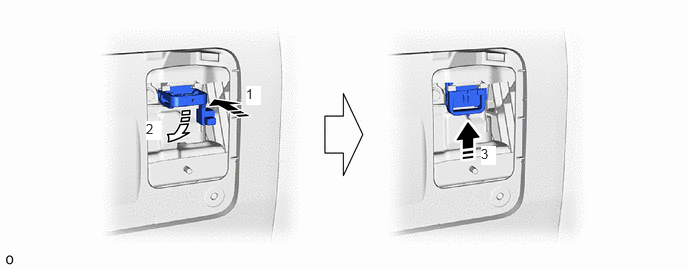
Rotate the handle of the service plug grip 90° toward the HV battery and slide it in the direction indicated by the arrow (3) shown in the illustration until a click sound is heard to install the service plug grip.
58441J
2.INSTALL BATTERY SERVICE HOLE COVER
3.CONNECT CABLE TO NEGATIVE AUXILIARY BATTERY TERMINAL
for A25A-FXS:
Click hereGeneral>MAINTENANCE>A25A-FXS AUXILIARY BATTERY>INSTALLATION
for A25B-FXS:
Click hereGeneral>MAINTENANCE>A25B-FXS AUXILIARY BATTERY>INSTALLATION
65351A
4.INSTALL BATTERY HOLE COVER
for A25A-FXS:
Click hereGeneral>MAINTENANCE>A25A-FXS AUXILIARY BATTERY>INSTALLATION
for A25B-FXS:
Click hereGeneral>MAINTENANCE>A25B-FXS AUXILIARY BATTERY>INSTALLATION
58416K
5.INSTALL REAR NO. 2 FLOOR BOARD
for A25A-FXS:
Click hereGeneral>MAINTENANCE>A25A-FXS AUXILIARY BATTERY>INSTALLATION
for A25B-FXS:
Click hereGeneral>MAINTENANCE>A25B-FXS AUXILIARY BATTERY>INSTALLATION
58410B
6.INSTALL DECK BOARD ASSEMBLY
for A25A-FXS:
Click hereGeneral>MAINTENANCE>A25A-FXS AUXILIARY BATTERY>INSTALLATION
for A25B-FXS:
Click hereGeneral>MAINTENANCE>A25B-FXS AUXILIARY BATTERY>INSTALLATION