Home › Audio/Visual/Telematics › AUDIO / VIDEO › TELEVISION DISPLAY

TELEVISION DISPLAY > INSTALLATION

for Preparation Click here


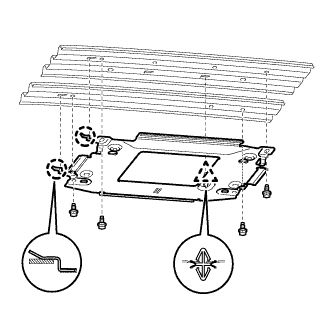
1. INSTALL TELEVISION DISPLAY BRACKET


E161065
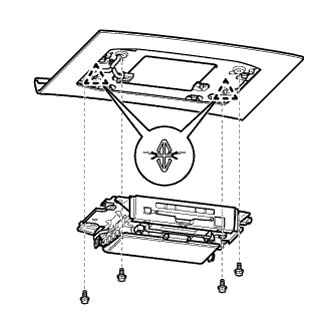
  1. Engage the clip and 2 claws to install the bracket.

  1. Install the 4 bolts.

    Torque:
    7.0 N*m{ 71 kgf*cm , 62 in.*lbf }

    HINT:
    Install the bolts in the order shown in the illustration.


2. INSTALL ROOF HEADLINING ASSEMBLY
  1. Install the roof headlining (Click here).


3. INSTALL TELEVISION DISPLAY ASSEMBLY


    E161064
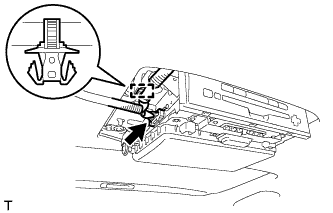
  1. Engage the 2 clips to install the television display.

  1. Install the 4 bolts.

    Torque:
    7.0 N*m{ 71 kgf*cm , 62 in.*lbf }

    HINT:
    Install the bolts in the order shown in the illustration.


    B191400
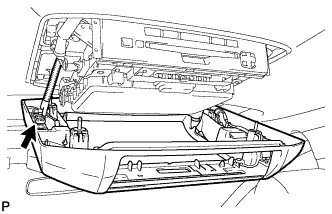
  1. Connect the connector.

  1. Engage the clamp.


4. INSTALL ROOM NO. 1 LIGHT ASSEMBLY


    B191797
  1. Connect the connector.


    B193891
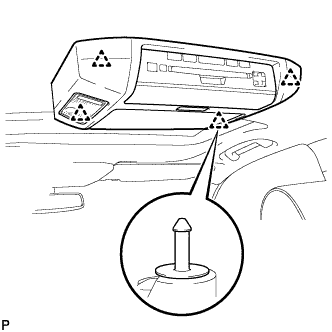
  1. Engage the 4 clips to install the No. 1 room light.


5. CONNECT CABLE TO NEGATIVE BATTERY TERMINAL

NOTICE:
When disconnecting the cable some systems need to be initialized after the cable is reconnected (Click here).

Torque:
5.4 N*m{ 55 kgf*cm , 48 in.*lbf }