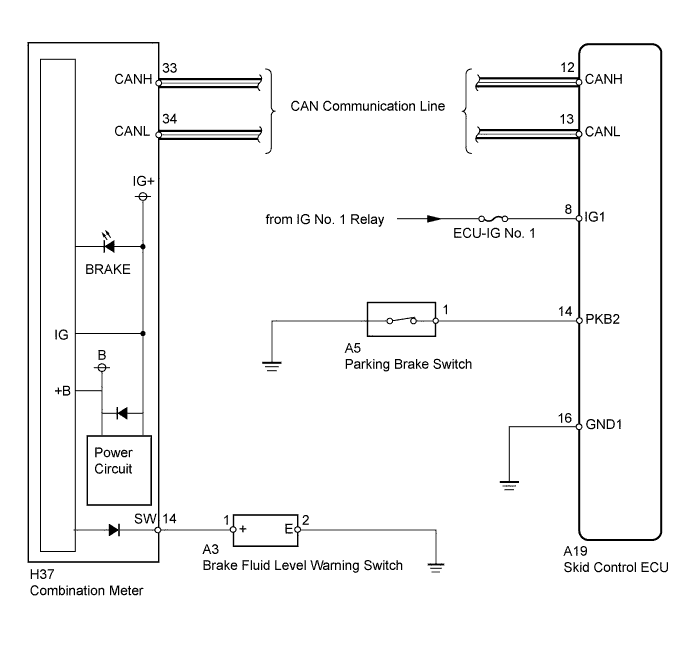
VEHICLE STABILITY CONTROL SYSTEM > Brake Warning Light Remains ON |
| 1.PREPARE FOR INSPECTION |
Check that both of the following conditions are satisfied.
| NEXT | |
 |
| 2.CHECK DTC |
Check if any ABS DTCs are output (Click here).
| Result | Proceed to |
| DTC is not output | A |
| DTC is output | B |
|
| ||||
| A | |
|
| 3.CHECK CAN COMMUNICATION SYSTEM |
Check if the CAN communication system DTC is output (Click here).
| Result | Proceed to |
| DTC is not output | A |
| DTC is output | B |
|
| ||||
| A | |
|
| 4.CHECK CONNECTOR CONNECTION CONDITION |
Check if the skid control ECU connector is connected securely.
|
| ||||
| OK | |
|
| 5.CHECK PARKING BRAKE SWITCH ASSEMBLY |
Connect the Techstream to the DLC3.
Turn the ignition switch to ON.
Turn the Techstream ON.
Select Data List mode and check the parking brake switch using the Techstream.
| Tester Display | Measurement Item/Range | Normal Condition | Diagnostic Note |
| Parking Brake SW | Parking brake switch / ON or OFF | ON: Parking brake applied OFF: Parking brake released | - |
Check that "ON" and "OFF" are properly indicated on the Techstream display when the parking brake lever is operated.
|
| ||||
| OK | |
|
| 6.CHECK BRAKE FLUID LEVEL WARNING SWITCH |
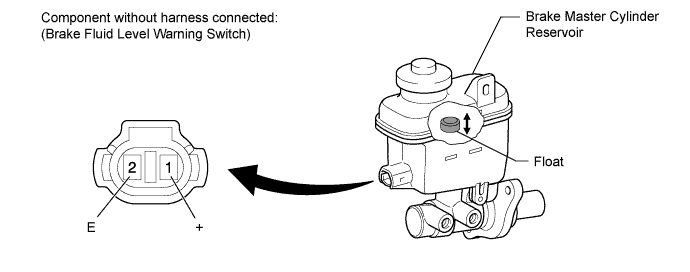
Remove the reservoir tank cap and strainer.
Disconnect the A3 switch connector.
Measure the resistance according to the value(s) in the table below.
| Tester Connection | Switch Condition | Specified Condition |
| 1 (+) - 2 (E) | Float up (Switch OFF) | 10 kΩ or higher |
| 1 (+) - 2 (E) | Float down (Switch ON) | Below 1 Ω |
|
| ||||
| OK | |
|
| 7.CHECK HARNESS AND CONNECTOR (COMBINATION METER - BRAKE FLUID LEVEL WARNING SWITCH) |
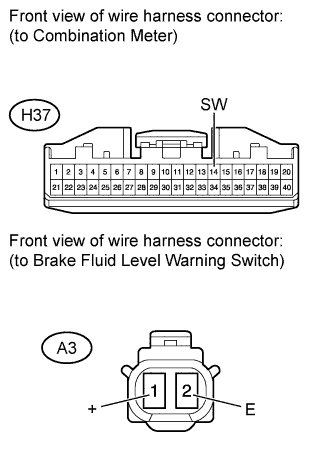 |
Disconnect the H37 meter connector.
Disconnect the A3 switch connector.
Measure the resistance according to the value(s) in the table below.
| Tester Connection | Condition | Specified Condition |
| H37-14 (SW) - A3-1 (+) | Always | Below 1 Ω |
| H37-14 (SW) - Body ground | Always | 10 kΩ or higher |
| A3-2 (E) - Body ground | Always | Below 1 Ω |
|
| ||||
| OK | |
|
| 8.PERFORM ACTIVE TEST USING TECHSTREAM (BRAKE WARNING LIGHT) |
Connect the Techstream to the DLC3.
Turn the ignition switch to ON.
Turn the Techstream ON.
Select Active Test mode and operate the BRAKE warning light using the Techstream.
| Tester Display | Test Part | Control Range | Diagnostic Note |
| Brake Warning Light | BRAKE warning light | Warning light ON/OFF | Observe combination meter |
Check that the BRAKE warning light turns on and off in the combination meter using the Techstream.
|
| ||||
| OK | ||
 | ||
| ||
| 9.INSPECT PARKING BRAKE SWITCH ASSEMBLY |
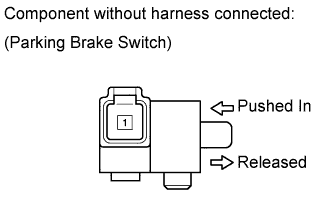 |
Disconnect the A5 switch connector.
Measure the resistance according to the value(s) in the table below.
| Tester Connection | Switch Condition | Specified Condition |
| 1 - Body ground | Parking brake switch ON (Switch pin released) | Below 1 Ω |
| 1 - Body ground | Parking brake switch OFF (Switch pin pushed in) | 10 kΩ or higher |
|
| ||||
| OK | |
|
| 10.CHECK HARNESS AND CONNECTOR (SKID CONTROL ECU - PARKING BRAKE SWITCH) |
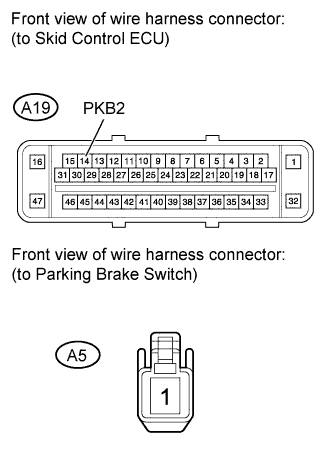 |
Disconnect the A19 ECU connector.
Disconnect the A5 switch connector.
Measure the resistance according to the value(s) in the table below.
| Tester Connection | Condition | Specified Condition |
| A19-14 (PKB2) - A5-1 | Always | Below 1 Ω |
| A19-14 (PKB2) - Body ground | Always | 10 kΩ or higher |
|
| ||||
| OK | ||
| ||
| ||

