ECM > INSTALLATION |
| 1. INSTALL GASKET |
Clean the ECM seal's surface with non-residue solvent.
Attach a new gasket to the ECM.
| 2. INSTALL ECM |
![]() |
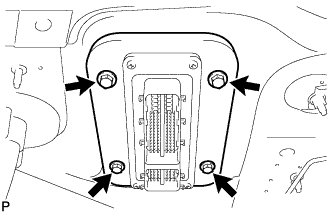
Install the ECM with the 4 bolts.
![]() |
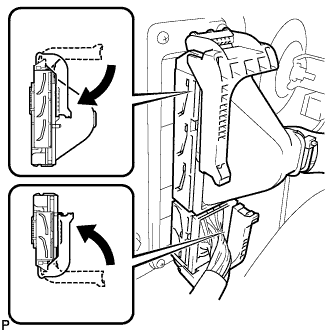
Connect the 2 ECM connectors and push each lock lever down to lock the ECM connectors.
| 3. CONNECT CONNECTOR HOLDER BLOCK |
![]() |
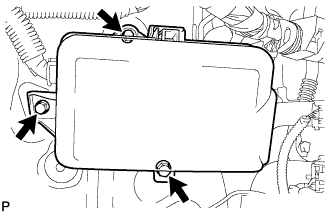
Connect the connector holder block with the 3 bolts.
| 4. INSTALL AIR CLEANER ASSEMBLY |
![]() |
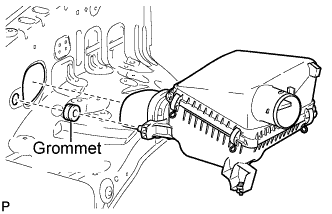
Attach grommet to air cleaner before mounting the air cleaner.
Insert the air cleaner into the fender apron hole, and fully insert pin to grommet.
![]() |
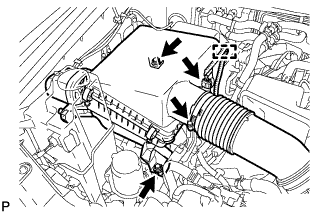
Install the air cleaner with the 2 bolts.
Connect the connector and install the clamp and wire harness.
Connect the air cleaner hose and tighten the clamp.
| 5. ALCOHOL DENSITY LEARNING INITIALIZATION |
Clear DTCs (Click here).
| 6. ALCOHOL DENSITY LEARNING |
Connect the Techstream to the DLC3.
Start the engine and allow it to idle for approximately 10 minutes.
Turn the Techstream main switch ON.
Enter the following menus: Powertrain / Engine and ECT / Data List / Alcohol Density Learning
Check that "Compl" is displayed for "Alcohol Density Learning".
If "Compl" is not displayed, drive the vehicle for approximately 15 minutes, and then check "Alcohol Density Learning" again.
| 7. PERFORM INITIALIZATION |
Perform initialization procedures (Click here).