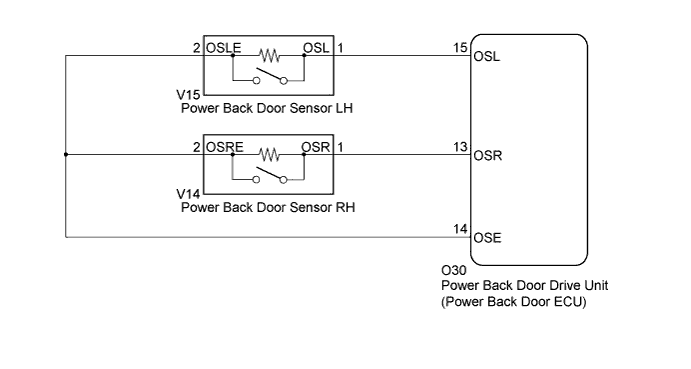
POWER BACK DOOR SYSTEM > Power Back Door cannot be Operated Using Any Switch |
| 1.INITIALIZE POWER BACK DOOR ECU |
Check that the power back door drive unit (power back door ECU) can be initialized (Click here).
| NEXT | |
 |
| 2.CHECK POWER BACK DOOR SYSTEM |
Check the power back door system operation.
|
| ||||
| OK | ||
 | ||
| ||
| 3.CHECK BACK DOOR CLOSER SYSTEM |
Check the back door closer system operation (Click here).
|
| ||||
| OK | |
|
| 4.CHECK COMBINATION METER |
Check the A/T shift position indicator operation.
Check that the speedometer indicates 0 mph when the vehicle is stopped and the engine idling.
|
| ||||
| OK | |
|
| 5.CHECK DTC OUTPUT |
Check for the DTCs (Click here).
| Result | Proceed to |
| DTC is not output | A |
| B2250 is output | B |
| B2251 is output | C |
|
| ||||
|
| ||||
| A | |
|
| 6.READ VALUE USING TECHSTREAM |
Connect the Techstream to the DLC3
Turn the ignition switch to ON.
Turn the Techstream on.
Enter the following menus: Body Electrical / Main Body / Data List /
According to the display on the Techstream, read the Data List.
| Tester Display | Measurement Item/Range | Normal Condition | Diagnostic Note |
| Back Dor Open | Back door lock / Permit or prohibit | Permit: Back door is unlocked Prohibit: Back door is locked | - |
|
| ||||
| OK | |
|
| 7.READ VALUE USING TECHSTREAM |
Connect the Techstream to the DLC3
Turn the ignition switch to ON.
Turn the Techstream on.
Enter the following menus: Body Electrical / Back Door / Data List /
According to the display on the Techstream, read the Data List.
| Tester Display | Measurement Item/Range | Normal Condition | Diagnostic Note |
| PBD Touch Sen L | Power back door touch sensor LH signal / ON or OFF | ON: Power back door touch sensor LH pressed OFF: Power back door touch sensor LH not pressed | - |
| PBD Touch Sen R | Power back door touch sensor RH signal / ON or OFF | ON: Power back door touch sensor RH pressed OFF: Power back door touch sensor RH not pressed | - |
|
| ||||
| OK | ||
| ||
| ||

