Home › Audio/Visual/Telematics › NAVIGATION / MULTI INFO DISPLAY › NAVIGATION SYSTEM (for SD)

DTC    B158B    Touch Switch Malfunction

for Preparation Click here


DESCRIPTION

This DTC is stored when a malfunction occurs in a panel switch.

DTC Code
DTC Detection Condition
Trouble Area
B158B
Touch switch malfunction
Navigation receiver assembly

INSPECTION PROCEDURE

1.CHECK MULTI-DISPLAY
  1. Check if there is any foreign matter caught between the display and exterior frame of the multi-display.

    OK:
    No foreign matter is caught between the display and exterior frame of the multi-display.

    HINT:
    If there is foreign matter between the display and exterior frame of the multi-display, the touch panel will remain pressed, preventing touch switch operation.


NG
REMOVE FOREIGN MATTER
OK


2.CHECK TOUCH PANEL
  1. Check for foreign matter on the display.

    OK:
    The display is clean.


NG
CLEAN DISPLAY AND RECHECK TOUCH PANEL
OK


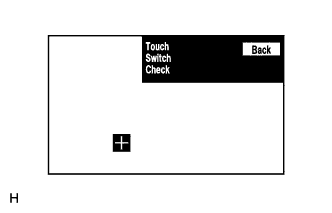
3.CHECK TOUCH SWITCH


    E176521
  1. Enter the "Function Check/Setting" mode and select "Touch Switch" (Click here).

  1. Touch the display in the area where the switch malfunction occurs.

    OK:
    A "+" mark appears at the touched position.


NG
REPLACE NAVIGATION RECEIVER ASSEMBLY (Click here)
OK

USE SIMULATION METHOD TO CHECK (Click here)