AUDIO / VIDEO INSTRUMENT PANEL SPEAKER INSPECTION
PROCEDURE

 86160P
1.INSPECT FRONT NO. 2 SPEAKER ASSEMBLY (for 8 or 12 Speakers)
When there is a malfunction such as noise from a speaker or no sound at all, replace the speaker with a new one and check that the malfunction disappears.
- OK:
Malfunction disappears.
- HINT:
- ·
Connect the connectors to the front No. 2 speakers.
·When there is a possibility that either the right or left front No. 2 speaker assembly is defective, inspect by interchanging the right one with the left one.
·Perform the inspection above on both the LH and RH sides.
86160P
2.INSPECT FRONT NO. 2 SPEAKER ASSEMBLY (for 14 Speakers)
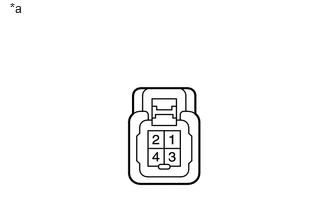
Measure the resistance according to the value(s) in the table below.
- Standard Resistance:
Tester Connection Condition Specified Condition 3 - 4 Always 1.5 to 2.5 Ω 3 - 1 Always Below 1 Ω 4 - 2
If the result is not as specified, replace the front No. 2 speaker assembly.
| *a | Component without harness connected
(Front No. 2 Speaker Assembly) |
86160L
3.INSPECT FRONT NO. 4 SPEAKER ASSEMBLY (for 14 Speakers)
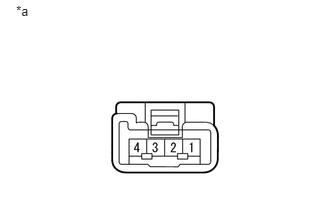
Measure the resistance according to the value(s) in the table below.
- Standard Resistance:
Tester Connection Condition Specified Condition 1 - 2 Always 1.5 to 2.1 Ω
If the result is not as specified, replace the front No. 4 speaker assembly.
| *a | Component without harness connected
(Front No. 4 Speaker Assembly) |