NAVIGATION / MULTI INFO DISPLAY NAVIGATION SYSTEM Satellite Radio Broadcast cannot be Received
WIRING DIAGRAM
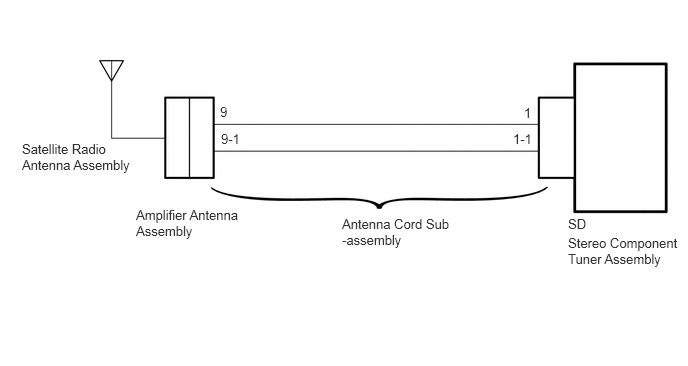
CAUTION / NOTICE / HINT
- NOTICE:
- ·
Some satellite radio broadcasts require payment. A contract must be made between a satellite radio company and the user. If the contract expires, it will not be possible to listen to the broadcast.
- ·
After replacing the stereo component tuner assembly of vehicles subscribed to pay-type satellite radio broadcasts, XM radio ID registration is necessary.
PROCEDURE
Check if the vehicle is in an environment where reception is difficult due to something blocking the area above the vehicle.
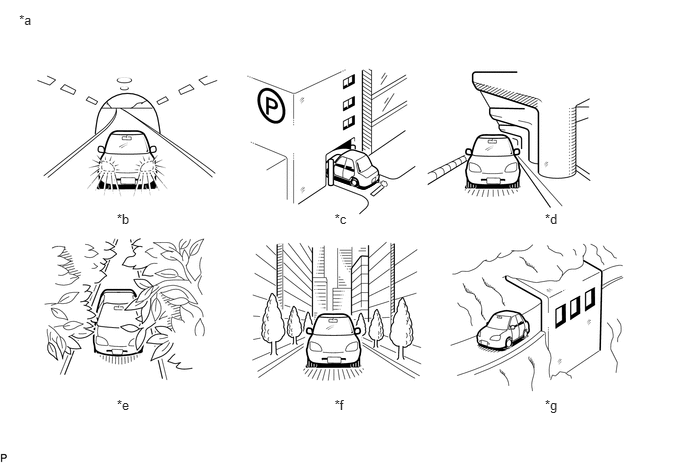
| *a | Example | *b | In a tunnel |
| *c | In a building | *d | Under an overpass |
| *e | On a forest or tree-lined path | *f | Between tall buildings |
| *g | Under a cliff or overhang | - | - |
- HINT:
-
If the area above the vehicle is blocked, such as when in a building or tunnel, reception may not be possible.
- OK:
Area above vehicle is not blocked.
OK
NG
Check if CH001 (free broadcast) can be received.
- OK:
CH001 can be received.
OK
NG
Check the display screen.
| Result | Proceed to |
|---|---|
| "UPDATING" is displayed | A |
| "-----" is displayed | B |
| None of the displays above are shown | C |
A
B
C
Check if the pay-type contract has been extended, or if the contract period has ended.
- OK:
Pay-type contract is valid.
OK
NG
Perform activation refresh by referring to the satellite radio company web site (https://care.siriusxm.com/retailrefresh_view.action).
- HINT:
-
The XM radio ID that is necessary to perform activation refresh is displayed when CH000 is selected on the satellite radio.
- OK:
Malfunction disappears.
OK
NG
(See pageAudio / Visual / Telematics>NAVIGATION / MULTI INFO DISPLAY>NAVIGATION SYSTEM>PROBLEM SYMPTOMS TABLE)
Check the display screen.
| Result | Proceed to |
|---|---|
| "SAT Check Antenna" is displayed | A |
| "SAT N. Signal" is displayed | B |
| "Loading" is displayed | |
| "SAT Channel Off Air" is displayed | C |
| After "---" is displayed, display automatically switches to CH001 | D |
| "SAT Ch Unauthorized" is displayed | E |
| "SAT Chan Unavailable" is displayed | |
| None of the displays above are shown |
A
B
C
D
E
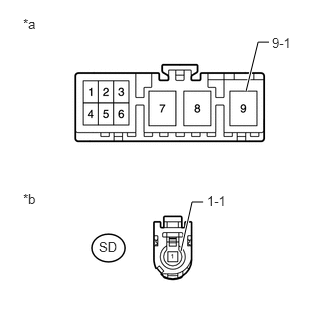
Disconnect the stereo component tuner assembly connector.
Disconnect the antenna connector from the amplifier antenna assembly.
Measure the resistance according to the value(s) in the table below.
- Standard Resistance:
Tester Connection Condition Specified Condition SD-1 - 9 Always Below 1 Ω SD-1-1 - 9-1 Always Below 1 Ω SD-1 - Body ground Always 10 kΩ or higher SD-1-1 - Body ground Always 10 kΩ or higher
| *a | Front view of wire harness connector
(to Amplifier Antenna Assembly) |
| *b | Front view of wire harness connector
(to Stereo Component Tuner Assembly) |
OK
NG
Replace the satellite radio antenna assembly with a known good one (See page Audio / Visual / Telematics>AUDIO / VIDEO>SATELLITE RADIO ANTENNA>REMOVAL).
Check if radio broadcasts can be received normally.
- OK:
Radio broadcasts can be received normally.
OK
NG
Replace the amplifier antenna assembly.
Check if radio broadcasts can be received normally.
- OK:
Radio broadcasts can be received normally.
OK
NG
Replace the stereo component tuner assembly with a known good one (See page Audio / Visual / Telematics>AUDIO / VIDEO>SATELLITE RADIO TUNER>REMOVAL).
Check if radio broadcasts can be received normally.
- OK:
Radio broadcasts can be received normally.
OK
NG
(See pageAudio / Visual / Telematics>NAVIGATION / MULTI INFO DISPLAY>NAVIGATION SYSTEM>PROBLEM SYMPTOMS TABLE)
Confirm if CH000 is currently selected.
- OK:
CH000 is selected.
OK
NG
(See pageAudio / Visual / Telematics>NAVIGATION / MULTI INFO DISPLAY>NAVIGATION SYSTEM>PROBLEM SYMPTOMS TABLE)