LIGHTING (INT) LIGHTING SYSTEM CUSTOMIZE PARAMETERS
PROCEDURE

 1. CUSTOMIZING FUNCTION WITH TECHSTREAM
- HINT:
-
The following items can be customized.
- NOTICE:
- ·
When the customer requests a change in a function, first make sure that the function can be customized.
·Be sure to make a note of the current settings before customizing.
·When troubleshooting a function, first make sure that the function is set to the default setting.
Connect the Techstream to the DLC3.
Turn the ignition switch to ON.
Turn the Techstream on.
Enter the following menus: Customize Setting / illuminated Entry or Light Control.
Select the setting by referring to the table below.
| Display | Default | Content | Setting |
|---|---|---|---|
| Lighting Time | 15s | Changes illumination duration after door closure
(It will quickly fade out when turning ignition switch ON) |
7.5s/15s/30s |
| I/L when ACC OFF | ON | Illuminates light when ignition switch turned to ACC → OFF
(Room light illuminated when interior light switch set to DOOR) |
ON/OFF |
| I/L ON W/Door Key Unlock | ON | Function to light up room light when unlocking with door key cylinder
(Room light illuminated when interior light switch set to DOOR) |
ON/OFF |
| Display | Default | Content | Setting |
|---|---|---|---|
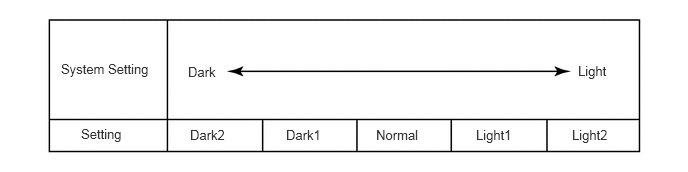
| Disp Ex ON Sen | NORMAL | Function to change level of ambient light at which system dims lights such as combination meter indicator light, A/C indicator light and clock light*1 | Light2/Light1/Normal/Dark1/Dark2 |
| Disp Ex OFF Sen | NORMAL | Function to change level of ambient light at which system cancels dimming of lights such as combination meter indicator light, A/C indicator light and clock light*2 | Light2/Light1/Normal/Dark1/Dark2 |
| Sensitivity | NORMAL | Function to adjust ambient light sensitivity of automatic light control system*3 | Light2/Light1/Normal/Dark1/Dark2 |
- HINT:
-
The sensitivity adjustment may be difficult to confirm. Check by driving the customer's vehicle.
- HINT:
-
When the setting is closer to the "Light" side, the system dims the indicator lights even when the surrounding area is relatively bright. When the setting is closer to the "Dark" side, the system waits until the surrounding area is darker before dimming the indicator lights.
- HINT:
-
When the setting is closer to the "Dark" side, the system cancels the dimming of the indicator lights even when the surrounding area is relatively dark. When the setting is closer to the "Light" side, the system waits until the surrounding area is brighter before canceling the dimming of the indicator lights.
- HINT:
-
When the setting is closer to the "Light" side, the system turns the lights on even when the surrounding area is relatively bright. When the setting is closer to the "Dark" side, the system waits until the surrounding area is darker before turning on the lights.