RM3650E
_56
Audio / Visual / Telematics
_080021
PARK ASSIST / MONITORING
_0388110
TELEVISION CAMERA
A
PARK ASSIST / MONITORING TELEVISION CAMERA REMOVAL
PROCEDURE

 1.REMOVE REAR BUMPER ASSEMBLY
2.REMOVE TELEVISION CAMERA ASSEMBLY
a.
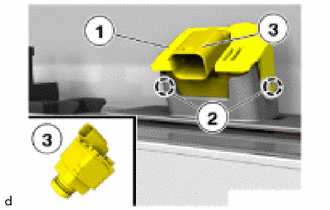
Detach the claws (2) to remove the holder (1).
b.
Remove the television camera assembly (3).
3.REMOVE BRACKET FOR REAR VIEW CAMERA
- HINT:
- ·
Perform this procedure only when replacement of the bracket for rear view camera is necessary.
·When removing the bracket for rear view camera, heat the rear bumper assembly and bracket for rear view camera using a heat light.
a.
Heat the rear bumper assembly and bracket for rear view camera using a heat light.
- CAUTION:
-
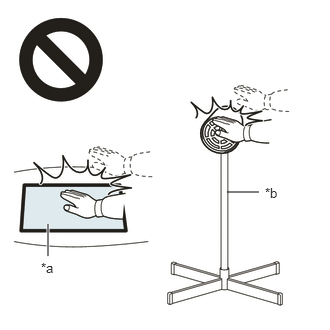 2.365,2 2.698,2 false 0.5,2.333 0.5,2.667 true 0.427,2.708 0.74,2.865 0.313,0.156 10 false *a 2.76,1.927 3.073,2.083 0.313,0.156 10 false *b
*a Heated Part *b Heat Light
- ·
Do not touch the heat light and heated parts.
·Touching the heat light may result in burns.
·Touching heated parts for a long time may result in burns.
- Standard:
Item Temperature Rear Bumper Assembly 40 to 50°C (104 to 122°F) Bracket for Rear View Camera
b.
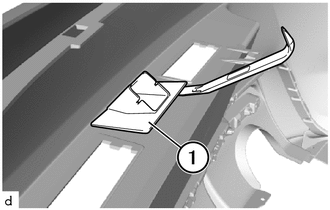
Using a moulding remover A, remove the bracket for rear view camera (1).