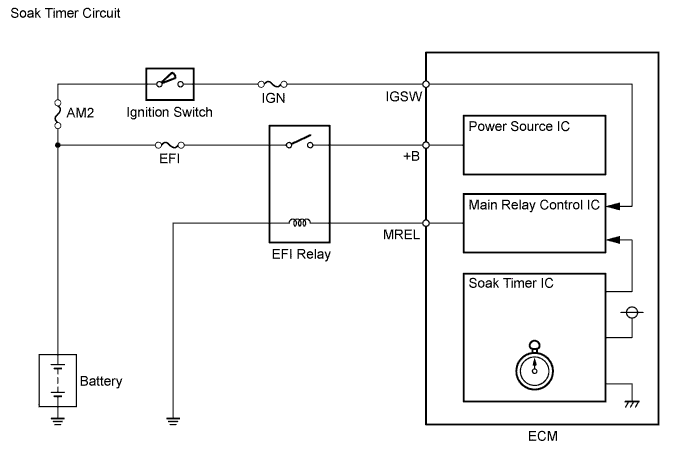
DTC P2610 ECM / PCM Internal Engine Off Timer Performance |
| DTC No. | Monitoring Item | Malfunction Detection Condition | Trouble Area | Detection Timing | Detection Logic |
| P2610 | Soak timer (built into ECM) | ECM internal malfunction | ECM | Engine running | 2 trip |
| Related DTC | P2610: ECM internal engine off timer performance |
| Required Sensors/Components (Main) | ECM |
| Required Sensors/Components (Related) | - |
| Frequency of Operation | Once per driving cycle |
| Duration | - |
| MIL Operation | 2 driving cycles |
| Sequence of Operation | None |
| Monitor runs whenever following DTCs not stored | None |
| Ignition switch | ON |
| Engine | Running |
| Battery voltage | 8 V or more |
| Starter | OFF |
| CPU clock elapsed time | 10 minutes or more |
| Internal engine off timer (elapsed time from engine stop) | Less than 1800 seconds |
| Battery voltage | 8 V or more |
| Ignition switch | ON |
| Starter | OFF |
| Internal engine off timer (elapsed time from engine stop) | 2400 seconds or more |
| Battery voltage | 8 V or more |
| Ignition switch | ON |
| Starter | OFF |
| Internal engine off timer (elapsed time from engine stop) | Less than 7 minutes, or more than 13 minutes |
| ECM had the started record by internal engine off timer | Yes |
| ECM had the started record by internal engine off timer | No |
| Techstream Display | Description |
| NORMAL |
|
| ABNORMAL |
|
| INCOMPLETE |
|
| N/A |
|
| 1.REPLACE ECM |
Replace the ECM (Click here).
| NEXT | |
 |
| 2.CHECK WHETHER DTC OUTPUT RECURS (DTC P2610) |
Connect the Techstream to the DLC3.
Turn the ignition switch to ON.
Turn the Techstream on.
Clear DTCs (Click here).
Turn the ignition switch off and wait for at least 30 seconds.
Turn the ignition switch to ON.
Turn the Techstream on.
Start the engine and wait for 10 minutes or more.
Enter the following menus: Powertrain / Engine and ECT / Trouble Codes.
Read pending DTCs.
| NEXT | ||
 | ||
| ||