Turn the ignition switch off.
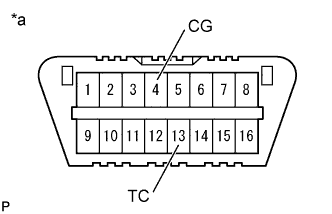 |
Using SST, connect terminals 13 (TC) and 4 (CG) of the DLC3.
- SST
- 09843-18040
| *a | Front view of DLC3 |
Turn the ignition switch to ON.
Read and record any DTCs from the tire pressure warning light on the combination meter.
- HINT:
- When the system is operating correctly, the light will blink continuously in a pattern of 0.25 seconds on, and then 0.25 seconds off.
- When one DTC is output, the light will output the same code at 4 second intervals (for example, code 21 would be output as 2 flashes, a 1.5 second pause, and then 1 flash).
- When 2 or more DTCs are output, the light will output each code at 2.5 second intervals, and when all codes have been output, there will be a 4 second pause and the sequence will repeat.
- When multiple codes are stored, they are output in order starting with the lowest DTC number.
- If the tire pressure warning light does not indicate any DTCs or the normal system code, inspect the tire pressure warning light circuit or TC and CG terminal circuit.
| Trouble Area | See page |
| Tire pressure warning light circuit |
Click here
|
| TC and CG terminal circuit |
Click here
|
Refer to the Diagnostic Trouble Code Chart (Click here) for DTC information.
After completing the check, turn the ignition switch off and remove SST from the DLC3.
- SST
- 09843-18040