REAR BUMPER (for Steel Type Bumper) > REMOVAL |
| 1. DISCONNECT CABLE FROM NEGATIVE BATTERY TERMINAL |
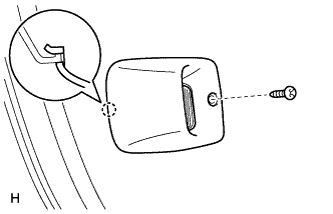
| 2. REMOVE LICENSE PLATE LIGHT ASSEMBLY LH |
|
Remove the screw.
Detach the claw and remove the license plate light.
| 3. REMOVE LICENSE PLATE LIGHT ASSEMBLY RH |
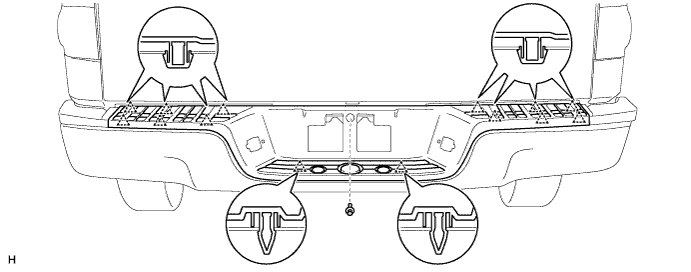
| 4. REMOVE REAR BUMPER PAD SUB-ASSEMBLY |
Remove the clip.
Detach the 14 clips and remove the rear bumper pad.
| 5. REMOVE REAR BUMPER PLATE LH |
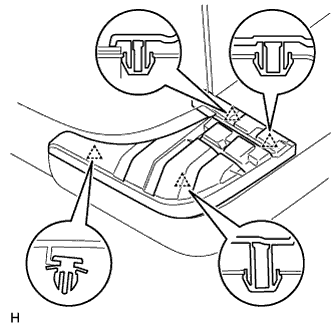 |
Detach the 4 clips and remove the rear bumper plate.
| 6. REMOVE REAR BUMPER PLATE RH |
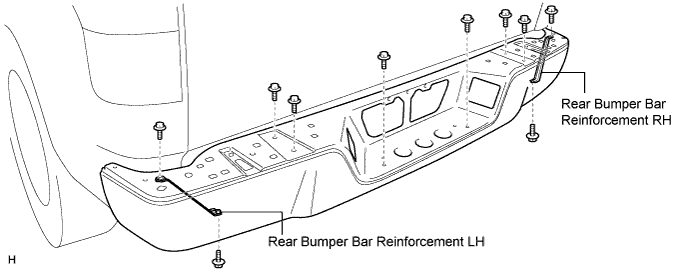
| 7. REMOVE REAR BUMPER BAR |
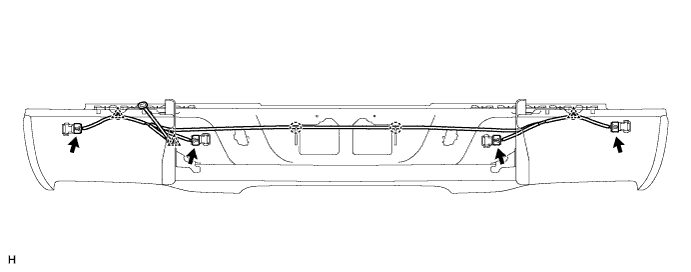
w/ Intuitive Parking Assist System:
Disconnect the connectors and clamps shown in the illustration.
Remove the 4 bolts and 2 bumper bar reinforcements.
Remove the 6 bolts and bumper bar.
| 8. REMOVE NO. 3 WIRE FRAME (w/ Trailer Towing System) |
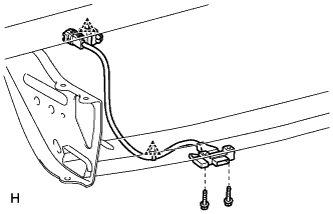 |
for 4 Pin Type:
Remove the No. 3 wire frame.
Disconnect the connector.
Detach the 2 clamps.
Remove the 2 bolts and wire frame.
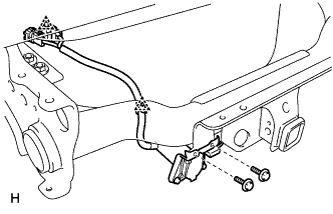 |
for 4 Pin and 7 Pin Type:
Remove the No. 3 wire frame.
Disconnect the connector.
Detach the 2 clamps.
Remove the 2 bolts and wire frame.