VIDEO TERMINAL (for Bench Seat Type) > REMOVAL |
| 1. DISCONNECT CABLE FROM NEGATIVE BATTERY TERMINAL |
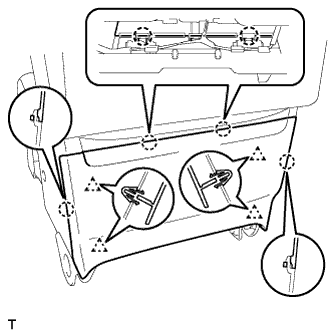
| 2. REMOVE CENTER SEAT BACK PANEL |
|
Detach the 4 claws and 4 clips, and remove the center seatback panel.
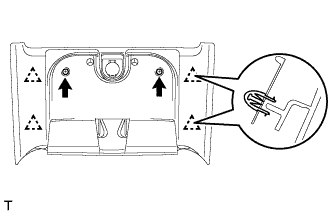 |
for Double Cab:
Remove the 2 screws.
Detach the 4 clips and remove the center seatback panel.
Disconnect the power outlet socket connector.
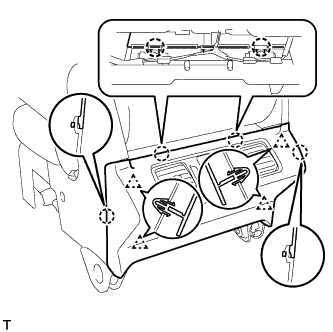 |
for CrewMax:
Detach the 4 claws and 4 clips, and remove the center seatback panel.
Disconnect the 2 connectors.
| 3. REMOVE NO. 1 CONSOLE BOX REGISTER ASSEMBLY |
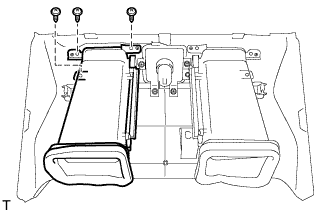 |
Remove the 3 screws and register.
| 4. REMOVE NO. 2 CONSOLE BOX REGISTER ASSEMBLY |
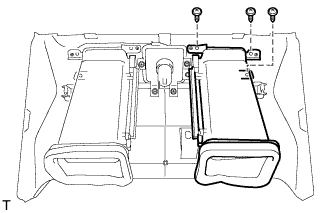 |
Remove the 3 screws and register.
| 5. REMOVE VIDEO TERMINAL |
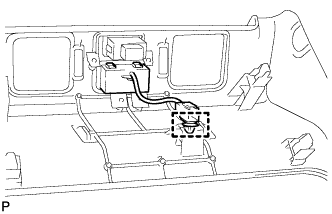 |
Detach the clamp from the back panel.
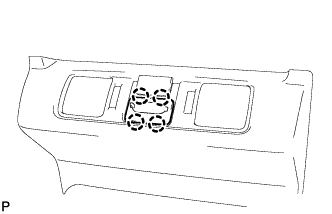 |
Detach the 4 claws and remove the video terminal.