RM27M0U
_58
Vehicle Interior
_049133
LIGHTING
_0234251
AUTOMATIC LIGHT CONTROL SENSOR
A
LIGHTING AUTOMATIC LIGHT CONTROL SENSOR REMOVAL
PROCEDURE

 55525
1.REMOVE NO. 1 SPEAKER HOLE COVER
3.107,0.801 3.299,0.980
0.192,0.179
10
*1
2.619,1.015 3.105,0.912
false
a.
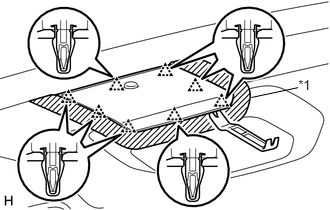
Put protective tape around the No. 1 speaker hole cover.
| *1 | Protective Tape |
b.
Using moulding remover B, detach the 8 clips.
c.
Disconnect the connector and remove the No. 1 speaker hole cover.
89120A
2.REMOVE AUTOMATIC LIGHT CONTROL SENSOR
a.
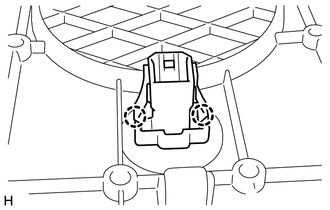
Detach the 2 claws and remove the automatic light control sensor.