BRAKE CONTROL / DYNAMIC CONTROL SYSTEMS BRAKE CONTROL POWER SUPPLY INSTALLATION
CAUTION / NOTICE / HINT
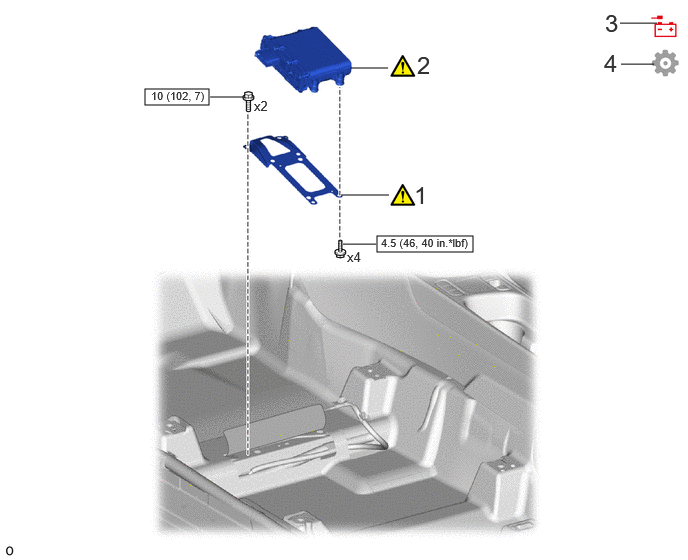
| Procedure | Part Name Code | 
|

|

|
|
|---|---|---|---|---|---|
| 1 | NO. 1 BRAKE CONTROL POWER SUPPLY BRACKET | 89686 | ( ) |
- | - |
| 2 | BRAKE CONTROL POWER SUPPLY ASSEMBLY | 89680 | ()
|
- | - |
| 3 | CABLE TO NEGATIVE AUXILIARY BATTERY TERMINAL | - | - | - | - |
| 4 | INITIALIZATION AFTER RECONNECTING AUXILIARY BATTERY TERMINAL | - | - | - | ()
|

|
Tightening torque for "Major areas involving basic vehicle performance such as moving/turning/stopping" : N*m (kgf*cm, ft.*lbf) | 
|
N*m (kgf*cm, ft.*lbf): Specified torque |
PROCEDURE

 89686
1.INSTALL NO. 1 BRAKE CONTROL POWER SUPPLY BRACKET
|
|
|
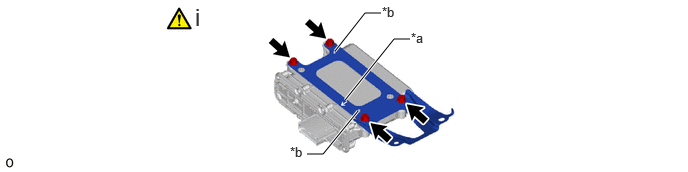
| *a | Arrow | *b | Align the hole on the No. 1 brake control power supply bracket with the protrusion of the brake control power supply assembly. |
Install the No. 1 brake control power supply bracket with 4 bolts.
- Torque:
- 4.5 N*m (46 kgf*cm, 40 in.*lbf)
- NOTICE:
-
Make sure to install the No. 1 brake control power supply bracket with its arrow facing the connector.
89680
2.INSTALL BRAKE CONTROL POWER SUPPLY ASSEMBLY
|
|
|
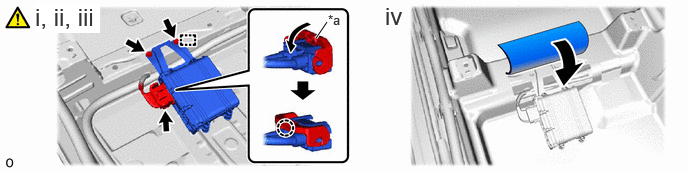
| *a | Lock Lever | - | - |
Connect the brake control power supply assembly connector.
Connect the brake control power supply assembly connector and push down the lock lever to engage the claw as shown in the illustration.
- NOTICE:
- ·
When connecting the brake control power supply assembly connector, make sure that the connecting parts of the brake control power supply assembly connector are free of dirt, water or other foreign matter.
·Be sure to securely connect the brake control power supply assembly connector.
Engage the hook and install the brake control power supply assembly with the 2 bolts.
- Torque:
- 10 N*m (102 kgf*cm, 7 ft.*lbf)
Install the floor carpet.
3.CONNECT CABLE TO NEGATIVE AUXILIARY BATTERY TERMINAL
4. INITIALIZATION AFTER RECONNECTING AUXILIARY BATTERY TERMINAL
Click hereGeneral>SETUP>WHEN DISCONNECTING OR RECONNECTING BATTERY TERMINAL>WORK PROCEDURE
- HINT:
-
When disconnecting and reconnecting the auxiliary battery, there is an automatic learning function that completes learning when the respective system is used.
-
Click hereGeneral>SETUP>WHEN DISCONNECTING OR RECONNECTING BATTERY TERMINAL>AUTOMATIC LEARNING CHART