METER / GAUGE / DISPLAY METER / GAUGE SYSTEM GENERAL/CONTROL/DETAILS DETAILS
OPERATING CONDITION
Eco Driving Indicator Light (Models with Automatic Transaxle)
Eco Driving Indicator Light starts to operate when all of the following conditions are met:
| Conditions | Ignition switch is ON. |
| Engine is running. | |
| Shift lever is in D. | |
| When the vehicle is at a speed of 130 km/h (81 mph) or below. |
Eco Driving Indicator Light stops operation when any of the following conditions is met:
| Conditions | Ignition switch is off. |
| Engine is stopped. | |
| Shift lever is in any position other than D. | |
| When the vehicle is at a speed of 130 km/h (81 mph) or over. |
SYSTEM CONTROL
Front Seat Belt Warning
When the ignition switch is ON, this system detects the state of the seat belts based on the signals from the front seat belt buckle switch LH and RH and the occupant detector sensor.
The front seat belt warning light located in the combination meter is used for both the driver and passenger seats.
After the ignition switch is turned ON, if the driver or front passenger has not fastened their seat belt, the seat belt warning light will begin flashing.
When the seat belt remains unfastened and the vehicle speed reaches approximately 20 km/h (12 mph), the seat belt warning buzzer will start sounding intermittently. At this time, the seat belt warning light flashing will change in sync with the intermittent buzzer sound. These buzzer and indicator warnings will continue for approximately 30 seconds until the seat belt is fastened.
If the seat belt still remains unfastened over the approximately 30 seconds, the intervals of the intermittent buzzer sound and flashing light will change, and such warnings will continue for approximately 90 seconds until the seat belt is fastened.
While the seat belt warning light and buzzer are operating, fastening the seat belt will bring them to a stop.
Rear Seat Belt Warning
If the meter ECU receives an off signal from the rear door courtesy light switch assembly when the ignition switch is ON, a rear seat belt warning light is shown on the telltale light assembly. At this time, if the meter ECU receives an on signal from a rear seat belt buckle switch, it will extinguish the telltale light corresponding to the rear seat belt buckle switch which sent the on signal. In addition, the rear seat belt warning light will automatically turn off approximately 34 seconds after the display.
If any of the rear seat belts are released while the vehicle speed is above 20 km/h (12 mph), the rear seat belt warning light illuminates and the buzzer is sounded. After 30 seconds, the sound change for emphasis. The sound continues for 90 seconds. Once the buzzer begins to sound, it will continue until the rear seat belt is buckled or the ignition switch is turned off.
Eco Driving Indicator Light (Models with Automatic Transaxle)
When the ECM determines that Eco driving (environment-friendly acceleration operation) is being performed, the ECM outputs an Eco Driving Indicator Light illumination request to the combination meter assembly that illuminates the Eco Driving Indicator Light.
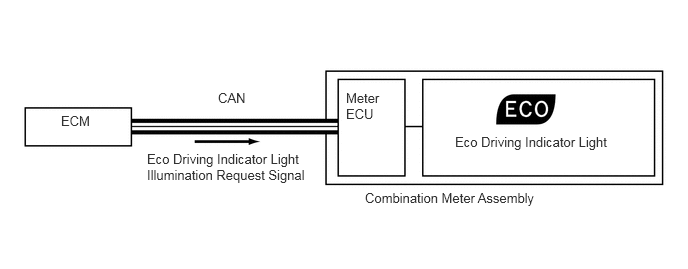
FUNCTION
Buzzer Function
The table below shows the buzzer in the combination meter assembly:
| Item |
|---|
|
*: Models with Toyota safety sense |
·
Pre-crash Safety System Operation Warning* ·
Front Seat Belt Warning ·
Rear Seat Belt Warning ·
Engine Oil Pressure Warning ·
EPS Warning ·
Engine Coolant Temperature Warning ·
Pre-crash Safety System Malfunction* ·
Lane Departure Alert Warning* ·
Engine Immobiliser Matching Completion Report ·
Parking Brake On Driving Warning ·
Door Open Driving Warning ·
Light Reminder ·
Turn Flasher Sound |
Multi-information Display Function
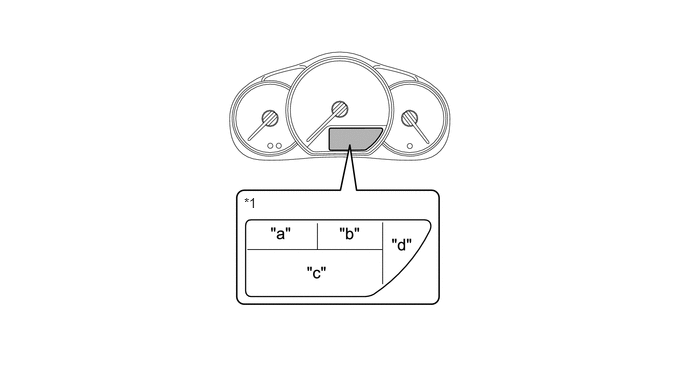
| *1 | Multi-information Display | - | - |
Display Area "a"
| Display | Display Item | Outline |
|---|---|---|

|
Clock Display | The clock is always displayed. |
Display Area "b"
| Display | Display Item | Outline |
|---|---|---|

|
Outside Temperature Display | The outside temperature is always displayed. |
Display Area "c"
| Display | Display Item | Outline |
|---|---|---|
|
*1: Models with Toyota safety sense *2: Models with automatic transaxle |
||
|
Odometer Display | Displays the odometer. |

|
Trip Meter A Display | Displays the trip meter A. |

|
Trip Meter B Display | Displays the trip meter B. |

|
Instantaneous Fuel Consumption Display | ·
Displays the value that has been calculated by the combination meter assembly, which is based on the distance driven and the fuel consumption volume. ·
This display is updated constantly. |

|
Average Fuel Consumption After Refueling Display | ·
Displays the value that has been calculated by the combination meter assembly, which is based on the distance driven after refueling and the fuel consumption. ·
The combination meter assembly resets the value when determining that the vehicle has been refueled according to the signal from the fuel sender gauge. ·
This display is updated every 10 seconds. |

|
Drivable Distance Display | ·
Displays the value that has been calculated by the combination meter assembly, which is based on the elapsed time and distance driven after the ignition switch, has been turned to ON. ·
This display is updated every 1 second. |
|
Average Vehicle Speed After Starting Display | ·
Displays a value that has been calculated by the combination meter assembly based on the vehicle speed signal and the elapsed time since the engine start signal. ·
This display is updated every 10 seconds. |

|
Dimming Mode Display | Adjust the meter luminance. |
|
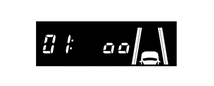
Lane Departure Alert Warning Sensitivity Customize Mode Display*1 | Customize to adjust lane departure alert warning sensitivity. |

|
Eco Driving Indicator Light Customize Mode Display*2 | ·
Customize Eco Driving Indicator Light. ·
When selecting this display, the Eco Driving Indicator Light is blinking. |

|
Pre-crash Safety Warning Timing Display*1 | Adjust the pre-crash safety warning timing. For details, refer to the section of pre-crash safety system. |

|
Lane Departure Alert System Information Display*1 | Displays information of lane departure alert system. |
Display Area "d"
| Display | Display Item | Outline |
|---|---|---|
|
*: Models with automatic transaxle |
||

|
Shift Position Indicator* | Displays shift position P, R, N, D or B of the automatic transaxle. |
OPERATION
Switching the Multi-information Display
The multi-information display changes in the order shown below by pressing the ODO/TRIP DISP switch.
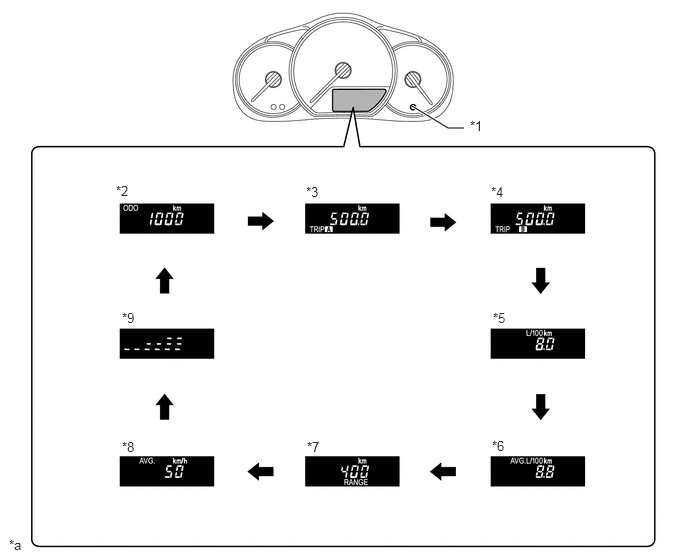
| *1 | ODO/TRIP DISP Switch | *2 | Odometer Display |
| *3 | Trip Meter A Display | *4 | Trip Meter B Display |
| *5 | Instantaneous Fuel Consumption Display | *6 | Average Fuel Consumption After Refueling Display |
| *7 | Drivable Distance Display | *8 | Average Vehicle Speed After Starting Display |
| *9 | Dimming Mode Display (While Taillights ON) | - | - |
| *a | The illustrations shown are examples only. | - | - |

|
Pressing the ODO/TRIP DISP switch | - | - |
Customize Mode Display Function
Pressing and holding the ODO/TRIP DISP switch for approximately 5 seconds when the odometer is displayed changes the display to the each customize mode display.
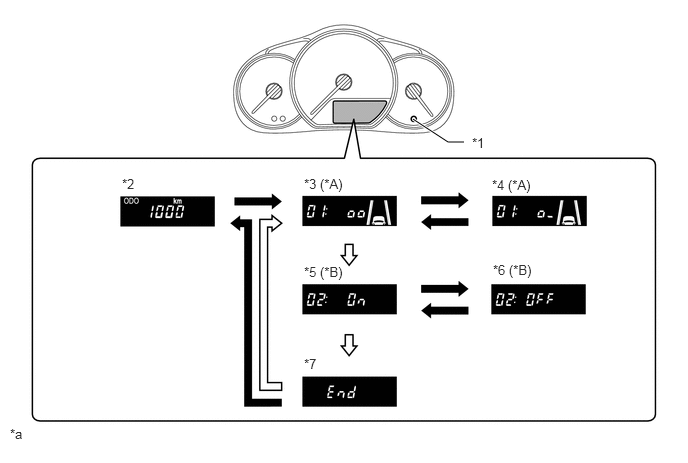
| *A | Models with Toyota Safety Sense | *B | Models with Automatic Transaxle |
| *1 | ODO/TRIP DISP Switch | *2 | Odometer Display |
| *3 | Lane Departure Alert Warning Sensitivity Customize Mode Display
·
Lane Departure Alert Warning Sensitivity is High. |
*4 | Lane Departure Alert Warning Sensitivity Customize Mode Display
·
Lane Departure Alert Warning Sensitivity is Standard. |
| *5 | Eco Driving Indicator Light Customize Mode Display
·
Eco Driving Indicator Light is enabled. |
*6 | Eco Driving Indicator Light Customize Mode Display
·
Eco Driving Indicator Light is disabled. |
| *7 | End of Customize Mode Display | - | - |
| *a | The illustrations shown are examples only. | - | - |
|
|
Pressing the ODO/TRIP DISP switch for approximately 5 seconds | 
|
Pressing the ODO/TRIP DISP switch |
Dimming Mode Display Function
The brightness level of the combination meter assembly can be displayed on the multi-information display to adjust the meter luminance.
While the dimming mode is displayed, the brightness of the meter can be changed by pressing the ODO/TRIP DISP switch for 1 second or more. The brightness of the meter can be adjusted in 4 levels.
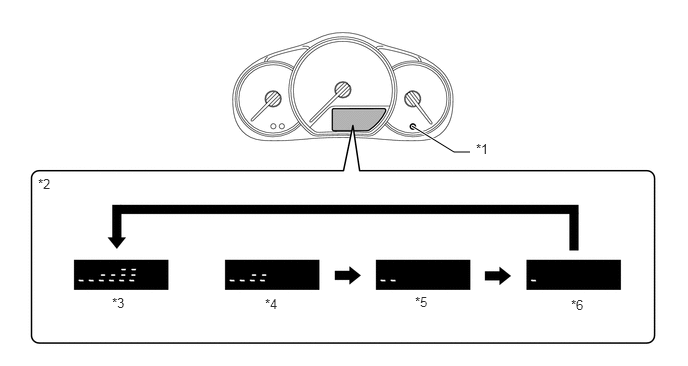
| *1 | ODO/TRIP DISP Switch | *2 | Meter Brightness |
| *3 | 100% | *4 | 75% |
| *5 | 50% | *6 | 25% |